テーマ: 仕様書(Spec)こそが最強のプロンプトである。 対象: YouTube音声抽出・Whisper文字起こし・LLM校正アプリ。
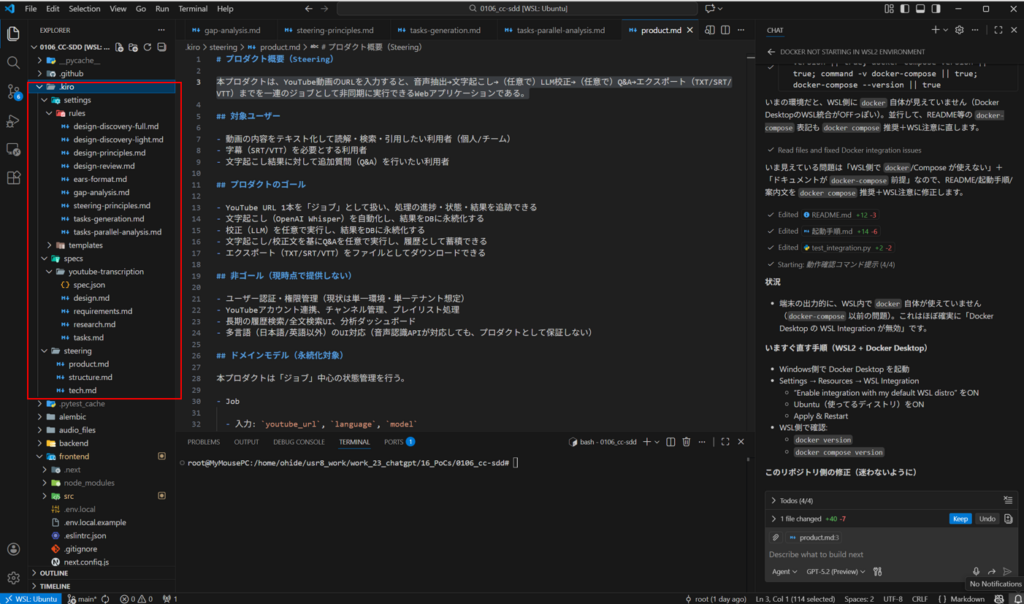
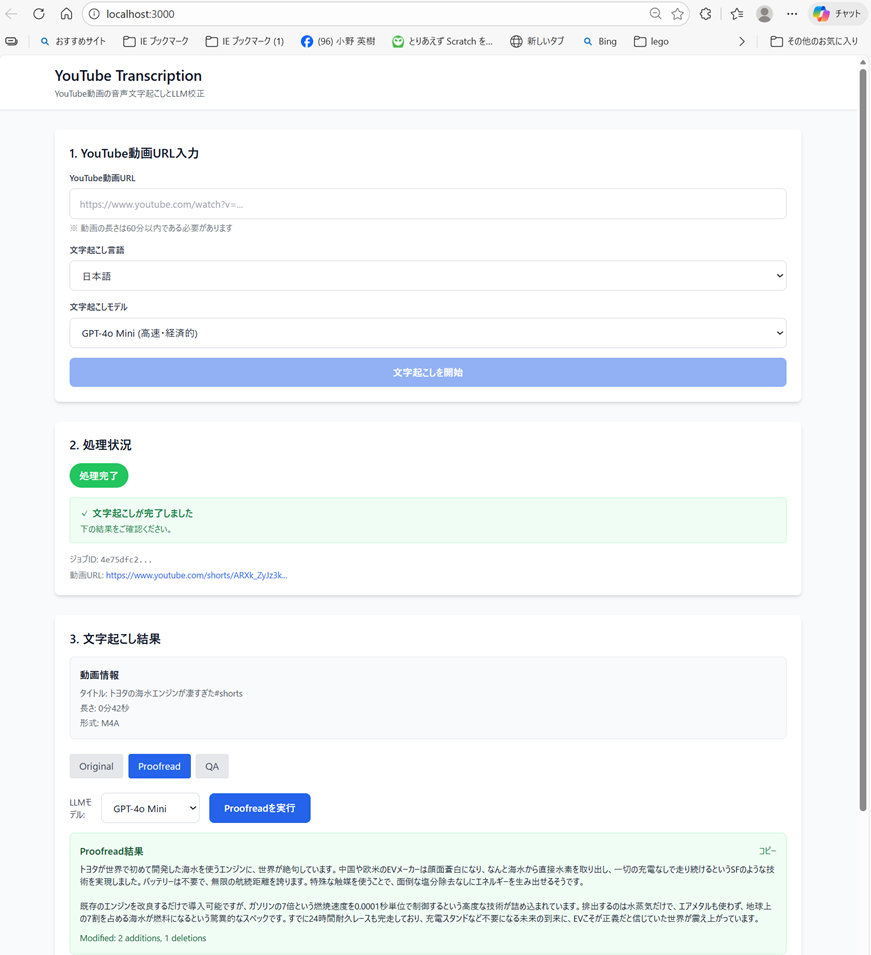
- 1.7 Task-Generation.md @setting/rules
- 1.8 Tasks Parallel Analysis.md @setting/rules
- 2.1 design.md @specs/youtube-transcription
- 2.2 requirements.md @specs/youtube-transcription
- 2.3 research.md @specs/youtube-transcription
- 2.4. tasks.md @specs/youtube-transcription
- 3.1. product.md @steering
- 3.2 structure.md @steering
- 3.3 tech.md @steering
1. .kiro とは何か?(開発の脳)
.kiro は、AIエージェントに「思考の型」と「出力フォーマット」を強制するルールセット群。 曖昧な指示を排除し、「ルール → 仕様 → コード」 の一方向フローを確立する。
- 役割: プロジェクトの憲法。AIの自由度を下げ、精度を上げる。
- 構成要素:
- Steering: 設計思想、禁止事項(
design-principles.md) - Format: 要求定義の構文(
ears-format.md) - Process: 思考プロセス(
design-discovery-full.md)
- Steering: 設計思想、禁止事項(
2. 仕様からコードへの変換フロー
.kiro のルールに従い生成された仕様書(Markdown)が、そのまま実装の設計図となる。
Step 1: 要求定義 (requirements.md)
- Input (.kiro):
ears-format.md(EARS構文) - Output (Spec):”When ユーザーがURLを入力, the システムは YouTube形式を検証すること”
- Coding:
- この文章がそのまま E2Eテスト / 単体テストの
it/testケース名 になる。 - Pydanticのバリデーター (
@validator) 実装の根拠となる。
- この文章がそのまま E2Eテスト / 単体テストの
Step 2: 設計と境界 (design.md)
- Input (.kiro):
design-principles.md(責務分離・型安全性) - Output (Spec):
- Backend: FastAPI + Celery (非同期ジョブ)
- Worker:
transcription_task,correction_task
- Coding:
- Router:
backend/routers/jobs.pyを作成し、Spec定義のエンドポイントを機械的に実装。 - Model:
backend/models.pyにJob,Transcriptテーブルを定義(Specのデータモデル項を参照)。
- Router:
Step 3: タスク分解 (tasks.md)
- Input (.kiro):
Task-Generation.md(実装手順の粒度制御) - Output (Spec):
[ ] 1.2 DBスキーマ設計[ ] 2.1 Whisper API統合
- Coding:
- このリストがそのまま Pull Request の単位 になる。
- AIに「タスク 2.1 を実装して」と投げるだけで、コンテキストが合う。
3. コーディング詳細(YouTubeアプリの実例)
仕様書が具体的であるため、実装は「翻訳」作業に近い。
A. 非同期ワーカーの実装
- Spec: 「ユーザー待機時間を避けるため、文字起こしは非同期で行う (Design: Architecture)」
- Code (
backend/worker.py):Python@celery.task(bind=True) def transcription_task(self, job_id: str): # 1. DBからジョブ取得 # 2. yt-dlpで音声DL (Service層呼び出し) # 3. Whisper APIへ送信 # 4. 結果をDB保存 & ステータス更新 pass
B. エラーハンドリング
- Spec: 「If 動画が60分超, the システムは エラーを返す (Requirements: 2.3)」
- Code (
backend/services/audio_extractor.py):Pythonif duration > 3600: raise VideoTooLongException("動画の長さが制限(60分)を超えています")
C. フロントエンド連携
- Spec: 「Job IDを用いてポーリングし、進捗を表示する (Design: System Flows)」
- Code (
frontend/hooks/useJobStatus.ts):useSWRやReact Queryを使い、/api/jobs/{id}/statusを定期監視するロジックを実装。
まとめ:なぜこの構成か?
- 迷わない:
.kiroが「書き方」を規定し、仕様書が「書くこと」を規定する。 - 手戻りゼロ: コーディング前に
design.mdで構造的欠陥(例: 同期処理によるタイムアウト)を検知・修正済み。 - AI親和性: AIは構造化されたテキスト(Markdown)の解釈が極めて得意。
付録:.kiro ルールファイル全集
以下は、本開発プロセスを制御するために使用された .kiro ルールセットの全内容である。
1.1 design-discovery-full.md @setting/rules
概要: 設計前の調査・分析フェーズを定義。技術選定やリスク評価のプロセスを標準化する。
# Full Discovery Process for Technical Design

## Objective
Conduct comprehensive research and analysis to ensure the technical design is based on complete, accurate, and up-to-date information.

## Discovery Steps

### 1. Requirements Analysis
**Map Requirements to Technical Needs**
- Extract all functional requirements from EARS format
- Identify non-functional requirements (performance, security, scalability)
- Determine technical constraints and dependencies
- List core technical challenges

### 2. Existing Implementation Analysis
**Understand Current System** (if modifying/extending):
- Analyze codebase structure and architecture patterns
- Map reusable components, services, utilities
- Identify domain boundaries and data flows
- Document integration points and dependencies
- Determine approach: extend vs refactor vs wrap

### 3. Technology Research
**Investigate Best Practices and Solutions**:
- **Use WebSearch** to find:
  - Latest architectural patterns for similar problems
  - Industry best practices for the technology stack
  - Recent updates or changes in relevant technologies
  - Common pitfalls and solutions

- **Use WebFetch** to analyze:
  - Official documentation for frameworks/libraries
  - API references and usage examples
  - Migration guides and breaking changes
  - Performance benchmarks and comparisons

### 4. External Dependencies Investigation
**For Each External Service/Library**:
- Search for official documentation and GitHub repositories
- Verify API signatures and authentication methods
- Check version compatibility with existing stack
- Investigate rate limits and usage constraints
- Find community resources and known issues
- Document security considerations
- Note any gaps requiring implementation investigation

### 5. Architecture Pattern & Boundary Analysis
**Evaluate Architectural Options**:
- Compare relevant patterns (MVC, Clean, Hexagonal, Event-driven)
- Assess fit with existing architecture and steering principles
- Identify domain boundaries and ownership seams required to avoid team conflicts
- Consider scalability implications and operational concerns
- Evaluate maintainability and team expertise
- Document preferred pattern and rejected alternatives in `research.md`

### 6. Risk Assessment
**Identify Technical Risks**:
- Performance bottlenecks and scaling limits
- Security vulnerabilities and attack vectors
- Integration complexity and coupling
- Technical debt creation vs resolution
- Knowledge gaps and training needs

## Research Guidelines

### When to Search
**Always search for**:
- External API documentation and updates
- Security best practices for authentication/authorization
- Performance optimization techniques for identified bottlenecks
- Latest versions and migration paths for dependencies

**Search if uncertain about**:
- Architectural patterns for specific use cases
- Industry standards for data formats/protocols
- Compliance requirements (GDPR, HIPAA, etc.)
- Scalability approaches for expected load

### Search Strategy
1. Start with official sources (documentation, GitHub)
2. Check recent blog posts and articles (last 6 months)
3. Review Stack Overflow for common issues
4. Investigate similar open-source implementations

## Output Requirements
Capture all findings that impact design decisions in `research.md` using the shared template:
- Key insights affecting architecture, technology alignment, and contracts
- Constraints discovered during research
- Recommended approaches and selected architecture pattern with rationale
- Rejected alternatives and trade-offs (documented in the Design Decisions section)
- Updated domain boundaries that inform Components & Interface Contracts
- Risks and mitigation strategies
- Gaps requiring further investigation during implementation
1.2 design-principles.md @setting/rules
概要: 技術設計における品質基準。型安全性、責務分離、ドキュメントの書き方を規定。
# Technical Design Rules and Principles

## Core Design Principles

### 1. Type Safety is Mandatory
- **NEVER** use `any` type in TypeScript interfaces
- Define explicit types for all parameters and returns
- Use discriminated unions for error handling
- Specify generic constraints clearly

### 2. Design vs Implementation
- **Focus on WHAT, not HOW**
- Define interfaces and contracts, not code
- Specify behavior through pre/post conditions
- Document architectural decisions, not algorithms

### 3. Visual Communication
- **Simple features**: Basic component diagram or none
- **Medium complexity**: Architecture + data flow
- **High complexity**: Multiple diagrams (architecture, sequence, state)
- **Always pure Mermaid**: No styling, just structure

### 4. Component Design Rules
- **Single Responsibility**: One clear purpose per component
- **Clear Boundaries**: Explicit domain ownership
- **Dependency Direction**: Follow architectural layers
- **Interface Segregation**: Minimal, focused interfaces
- **Team-safe Interfaces**: Design boundaries that allow parallel implementation without merge conflicts
- **Research Traceability**: Record boundary decisions and rationale in `research.md`

### 5. Data Modeling Standards
- **Domain First**: Start with business concepts
- **Consistency Boundaries**: Clear aggregate roots
- **Normalization**: Balance between performance and integrity
- **Evolution**: Plan for schema changes

### 6. Error Handling Philosophy
- **Fail Fast**: Validate early and clearly
- **Graceful Degradation**: Partial functionality over complete failure
- **User Context**: Actionable error messages
- **Observability**: Comprehensive logging and monitoring

### 7. Integration Patterns
- **Loose Coupling**: Minimize dependencies
- **Contract First**: Define interfaces before implementation
- **Versioning**: Plan for API evolution
- **Idempotency**: Design for retry safety
- **Contract Visibility**: Surface API and event contracts in design.md while linking extended details from `research.md`

## Documentation Standards

### Language and Tone
- **Declarative**: "The system authenticates users" not "The system should authenticate"
- **Precise**: Specific technical terms over vague descriptions
- **Concise**: Essential information only
- **Formal**: Professional technical writing

### Structure Requirements
- **Hierarchical**: Clear section organization
- **Traceable**: Requirements to components mapping
- **Complete**: All aspects covered for implementation
- **Consistent**: Uniform terminology throughout
- **Focused**: Keep design.md centered on architecture and contracts; move investigation logs and lengthy comparisons to `research.md`

## Section Authoring Guidance

### Global Ordering
- Default flow: Overview → Goals/Non-Goals → Requirements Traceability → Architecture → Technology Stack → System Flows → Components & Interfaces → Data Models → Optional sections.
- Teams may swap Traceability earlier or place Data Models nearer Architecture when it improves clarity, but keep section headings intact.
- Within each section, follow **Summary → Scope → Decisions → Impacts/Risks** so reviewers can scan consistently.

### Requirement IDs
- Reference requirements as `2.1, 2.3` without prefixes (no “Requirement 2.1”).
- All requirements MUST have numeric IDs. If a requirement lacks a numeric ID, stop and fix `requirements.md` before continuing.
- Use `N.M`-style numeric IDs where `N` is the top-level requirement number from requirements.md (for example, Requirement 1 → 1.1, 1.2; Requirement 2 → 2.1, 2.2).
- Every component, task, and traceability row must reference the same canonical numeric ID.

### Technology Stack
- Include ONLY layers impacted by this feature (frontend, backend, data, messaging, infra).
- For each layer specify tool/library + version + the role it plays; push extended rationale, comparisons, or benchmarks to `research.md`.
- When extending an existing system, highlight deviations from the current stack and list new dependencies.

### System Flows
- Add diagrams only when they clarify behavior:
  - **Sequence** for multi-step interactions
  - **Process/State** for branching rules or lifecycle
  - **Data/Event** for pipelines or async patterns
- Always use pure Mermaid. If no complex flow exists, omit the entire section.

### Requirements Traceability
- Use the standard table (`Requirement | Summary | Components | Interfaces | Flows`) to prove coverage.
- Collapse to bullet form only when a single requirement maps 1:1 to a component.
- Prefer the component summary table for simple mappings; reserve the full traceability table for complex or compliance-sensitive requirements.
- Re-run this mapping whenever requirements or components change to avoid drift.

### Components & Interfaces Authoring
- Group components by domain/layer and provide one block per component.
- Begin with a summary table listing Component, Domain, Intent, Requirement coverage, key dependencies, and selected contracts.
- Table fields: Intent (one line), Requirements (`2.1, 2.3`), Owner/Reviewers (optional).
- Dependencies table must mark each entry as Inbound/Outbound/External and assign Criticality (`P0` blocking, `P1` high-risk, `P2` informational).
- Summaries of external dependency research stay here; detailed investigation (API signatures, rate limits, migration notes) belongs in `research.md`.
- design.md must remain a self-contained reviewer artifact. Reference `research.md` only for background, and restate any conclusions or decisions here.
- Contracts: tick only the relevant types (Service/API/Event/Batch/State). Unchecked types should not appear later in the component section.
- Service interfaces must declare method signatures, inputs/outputs, and error envelopes. API/Event/Batch contracts require schema tables or bullet lists covering trigger, payload, delivery, idempotency.
- Use **Integration & Migration Notes**, **Validation Hooks**, and **Open Questions / Risks** to document rollout strategy, observability, and unresolved decisions.
- Detail density rules:
  - **Full block**: components introducing new boundaries (logic hooks, shared services, external integrations, data layers).
  - **Summary-only**: presentational/UI components with no new boundaries (plus a short Implementation Note if needed).
- Implementation Notes must combine Integration / Validation / Risks into a single bulleted subsection to reduce repetition.
- Prefer lists or inline descriptors for short data (dependencies, contract selections). Use tables only when comparing multiple items.

### Shared Interfaces & Props
- Define a base interface (e.g., `BaseUIPanelProps`) for recurring UI components and extend it per component to capture only the deltas.
- Hooks, utilities, and integration adapters that introduce new contracts should still include full TypeScript signatures.
- When reusing a base contract, reference it explicitly (e.g., “Extends `BaseUIPanelProps` with `onSubmitAnswer` callback”) instead of duplicating the code block.

### Data Models
- Domain Model covers aggregates, entities, value objects, domain events, and invariants. Add Mermaid diagrams only when relationships are non-trivial.
- Logical Data Model should articulate structure, indexing, sharding, and storage-specific considerations (event store, KV/wide-column) relevant to the change.
- Data Contracts & Integration section documents API payloads, event schemas, and cross-service synchronization patterns when the feature crosses boundaries.
- Lengthy type definitions or vendor-specific option objects should be placed in the Supporting References section within design.md, linked from the relevant section. Investigation notes stay in `research.md`.
- Supporting References usage is optional; only create it when keeping the content in the main body would reduce readability. All decisions must still appear in the main sections so design.md stands alone.

### Error/Testing/Security/Performance Sections
- Record only feature-specific decisions or deviations. Link or reference organization-wide standards (steering) for baseline practices instead of restating them.

### Diagram & Text Deduplication
- Do not restate diagram content verbatim in prose. Use the text to highlight key decisions, trade-offs, or impacts that are not obvious from the visual.
- When a decision is fully captured in the diagram annotations, a short “Key Decisions” bullet is sufficient.

### General Deduplication
- Avoid repeating the same information across Overview, Architecture, and Components. Reference earlier sections when context is identical.
- If a requirement/component relationship is captured in the summary table, do not rewrite it elsewhere unless extra nuance is added.

## Diagram Guidelines

### When to include a diagram
- **Architecture**: Use a structural diagram when 3+ components or external systems interact.
- **Sequence**: Draw a sequence diagram when calls/handshakes span multiple steps.
- **State / Flow**: Capture complex state machines or business flows in a dedicated diagram.
- **ER**: Provide an entity-relationship diagram for non-trivial data models.
- **Skip**: Minor one-component changes generally do not need diagrams.

### Mermaid requirements
```mermaid
graph TB
    Client --> ApiGateway
    ApiGateway --> ServiceA
    ApiGateway --> ServiceB
    ServiceA --> Database
1.3 design-review.md @setting/rules
概要: 設計レビューの実施要領であり、Go/No-Go判定の基準と、批判的かつ建設的なフィードバックの型を指定。
### 3. design-review.md
**概要**: 設計レビューの実施要領。Go/No-Go判定の基準と、批判的かつ建設的なフィードバックの型。

```markdown
# Design Review Process

## Objective
Conduct interactive quality review of technical design documents to ensure they are solid enough to proceed to implementation with acceptable risk.

## Review Philosophy
- **Quality assurance, not perfection seeking**
- **Critical focus**: Limit to 3 most important concerns
- **Interactive dialogue**: Engage with designer, not one-way evaluation
- **Balanced assessment**: Recognize strengths and weaknesses
- **Clear decision**: Definitive GO/NO-GO with rationale

## Scope & Non-Goals

- Scope: Evaluate the quality of the design document against project context and standards to decide GO/NO-GO.
- Non-Goals: Do not perform implementation-level design, deep technology research, or finalize technology choices. Defer such items to the design phase iteration.

## Core Review Criteria

### 1. Existing Architecture Alignment (Critical)
- Integration with existing system boundaries and layers
- Consistency with established architectural patterns
- Proper dependency direction and coupling management
- Alignment with current module organization

### 2. Design Consistency & Standards
- Adherence to project naming conventions and code standards
- Consistent error handling and logging strategies
- Uniform configuration and dependency management
- Alignment with established data modeling patterns

### 3. Extensibility & Maintainability
- Design flexibility for future requirements
- Clear separation of concerns and single responsibility
- Testability and debugging considerations
- Appropriate complexity for requirements

### 4. Type Safety & Interface Design
- Proper type definitions and interface contracts
- Avoidance of unsafe patterns (e.g., `any` in TypeScript)
- Clear API boundaries and data structures
- Input validation and error handling coverage

## Review Process

### Step 1: Analyze
Analyze design against all review criteria, focusing on critical issues impacting integration, maintainability, complexity, and requirements fulfillment.

### Step 2: Identify Critical Issues (≤3)
For each issue:

### Step 3: Recognize Strengths
Acknowledge 1-2 strong aspects to maintain balanced feedback.

### Step 4: Decide GO/NO-GO
- **GO**: No critical architectural misalignment, requirements addressed, clear implementation path, acceptable risks
- **NO-GO**: Fundamental conflicts, critical gaps, high failure risk, disproportionate complexity

## Traceability & Evidence

- Link each critical issue to the relevant requirement(s) from `requirements.md` (ID or section).
- Cite evidence locations in the design document (section/heading, diagram, or artifact) to support the assessment.
- When applicable, reference constraints from steering context to justify the issue.

## Output Format

### Design Review Summary
2-3 sentences on overall quality and readiness.

### Critical Issues (≤3)
For each: Issue, Impact, Recommendation, Traceability (e.g., 1.1, 1.2), Evidence (design.md section).

### Design Strengths
1-2 positive aspects.

### Final Assessment
Decision (GO/NO-GO), Rationale (1-2 sentences), Next Steps.

### Interactive Discussion
Engage on designer's perspective, alternatives, clarifications, and necessary changes.

## Length & Focus

- Summary: 2–3 sentences
- Each critical issue: 5–7 lines total (including Issue/Impact/Recommendation/Traceability/Evidence)
- Overall review: keep concise (~400 words guideline)

## Review Guidelines

1. **Critical Focus**: Only flag issues that significantly impact success
2. **Constructive Tone**: Provide solutions, not just criticism
3. **Interactive Approach**: Engage in dialogue rather than one-way evaluation
4. **Balanced Assessment**: Recognize both strengths and weaknesses
5. **Clear Decision**: Make definitive GO/NO-GO recommendation
6. **Actionable Feedback**: Ensure all suggestions are implementable

## Final Checklist

- **Critical Issues ≤ 3** and each includes Impact and Recommendation
- **Traceability**: Each issue references requirement ID/section
- **Evidence**: Each issue cites design doc location
- **Decision**: GO/NO-GO with clear rationale and next steps
1.4 ears-format.md @setting/rules
概要: 要求定義の標準構文(Easy Approach to Requirements Syntax)。曖昧さを排除するテンプレート。
# EARS Format Guidelines

## Overview
EARS (Easy Approach to Requirements Syntax) is the standard format for acceptance criteria in spec-driven development.

EARS patterns describe the logical structure of a requirement (condition + subject + response) and are not tied to any particular natural language.
All acceptance criteria should be written in the target language configured for the specification (for example, `spec.json.language` / `ja`).
Keep EARS trigger keywords and fixed phrases in English (`When`, `If`, `While`, `Where`, `The system shall`, `The [system] shall`) and localize only the variable parts (`[event]`, `[precondition]`, `[trigger]`, `[feature is included]`, `[response/action]`) into the target language. Do not interleave target-language text inside the trigger or fixed English phrases themselves.

## Primary EARS Patterns

### 1. Event-Driven Requirements
- **Pattern**: When [event], the [system] shall [response/action]
- **Use Case**: Responses to specific events or triggers
- **Example**: When user clicks checkout button, the Checkout Service shall validate cart contents

### 2. State-Driven Requirements
- **Pattern**: While [precondition], the [system] shall [response/action]
- **Use Case**: Behavior dependent on system state or preconditions
- **Example**: While payment is processing, the Checkout Service shall display loading indicator

### 3. Unwanted Behavior Requirements
- **Pattern**: If [trigger], the [system] shall [response/action]
- **Use Case**: System response to errors, failures, or undesired situations
- **Example**: If invalid credit card number is entered, then the website shall display error message

### 4. Optional Feature Requirements
- **Pattern**: Where [feature is included], the [system] shall [response/action]
- **Use Case**: Requirements for optional or conditional features
- **Example**: Where the car has a sunroof, the car shall have a sunroof control panel

### 5. Ubiquitous Requirements
- **Pattern**: The [system] shall [response/action]
- **Use Case**: Always-active requirements and fundamental system properties
- **Example**: The mobile phone shall have a mass of less than 100 grams

## Combined Patterns
- While [precondition], when [event], the [system] shall [response/action]
- When [event] and [additional condition], the [system] shall [response/action]

## Subject Selection Guidelines
- **Software Projects**: Use concrete system/service name (e.g., "Checkout Service", "User Auth Module")
- **Process/Workflow**: Use responsible team/role (e.g., "Support Team", "Review Process")
- **Non-Software**: Use appropriate subject (e.g., "Marketing Campaign", "Documentation")

## Quality Criteria
- Requirements must be testable, verifiable, and describe a single behavior.
- Use objective language: "shall" for mandatory behavior, "should" for recommendations; avoid ambiguous terms.
- Follow EARS syntax: [condition], the [system] shall [response/action].
1.5 Gap-analysis.md @setting/rules
概要: 現状コードと新機能のギャップ分析手法。実装アプローチ(拡張 vs 新規作成)の決定ロジック。
Markdown
# Gap Analysis Process

## Objective
Analyze the gap between requirements and existing codebase to inform implementation strategy decisions.

## Analysis Framework

### 1. Current State Investigation

- Scan for domain-related assets:
  - Key files/modules and directory layout
  - Reusable components/services/utilities
  - Dominant architecture patterns and constraints

- Extract conventions:
  - Naming, layering, dependency direction
  - Import/export patterns and dependency hotspots
  - Testing placement and approach

- Note integration surfaces:
  - Data models/schemas, API clients, auth mechanisms

### 2. Requirements Feasibility Analysis

- From EARS requirements, list technical needs:
  - Data models, APIs/services, UI/components
  - Business rules/validation
  - Non-functionals: security, performance, scalability, reliability

- Identify gaps and constraints:
  - Missing capabilities in current codebase
  - Unknowns to be researched later (mark as "Research Needed")
  - Constraints from existing architecture and patterns

- Note complexity signals:
  - Simple CRUD / algorithmic logic / workflows / external integrations

### 3. Implementation Approach Options

#### Option A: Extend Existing Components
**When to consider**: Feature fits naturally into existing structure

- **Which files/modules to extend**:
  - Identify specific files requiring changes
  - Assess impact on existing functionality
  - Evaluate backward compatibility concerns

- **Compatibility assessment**:
  - Check if extension respects existing interfaces
  - Verify no breaking changes to consumers
  - Assess test coverage impact

- **Complexity and maintainability**:
  - Evaluate cognitive load of additional functionality
  - Check if single responsibility principle is maintained
  - Assess if file size remains manageable

**Trade-offs**:
- ✅ Minimal new files, faster initial development
- ✅ Leverages existing patterns and infrastructure
- ❌ Risk of bloating existing components
- ❌ May complicate existing logic

#### Option B: Create New Components
**When to consider**: Feature has distinct responsibility or existing components are already complex

- **Rationale for new creation**:
  - Clear separation of concerns justifies new file
  - Existing components are already complex
  - Feature has distinct lifecycle or dependencies

- **Integration points**:
  - How new components connect to existing system
  - APIs or interfaces exposed
  - Dependencies on existing components

- **Responsibility boundaries**:
  - Clear definition of what new component owns
  - Interfaces with existing components
  - Data flow and control flow

**Trade-offs**:
- ✅ Clean separation of concerns
- ✅ Easier to test in isolation
- ✅ Reduces complexity in existing components
- ❌ More files to navigate
- ❌ Requires careful interface design

#### Option C: Hybrid Approach
**When to consider**: Complex features requiring both extension and new creation

- **Combination strategy**:
  - Which parts extend existing components
  - Which parts warrant new components
  - How they interact

- **Phased implementation**:
  - Initial phase: minimal viable changes
  - Subsequent phases: refactoring or new components
  - Migration strategy if needed

- **Risk mitigation**:
  - Incremental rollout approach
  - Feature flags or configuration
  - Rollback strategy

**Trade-offs**:
- ✅ Balanced approach for complex features
- ✅ Allows iterative refinement
- ❌ More complex planning required
- ❌ Potential for inconsistency if not well-coordinated
### 4. Out-of-Scope for Gap Analysis

- Defer deep research activities to the design phase.
- Record unknowns as concise "Research Needed" items only.

### 5. Implementation Complexity & Risk

  - Effort:
    - S (1–3 days): existing patterns, minimal deps, straightforward integration
    - M (3–7 days): some new patterns/integrations, moderate complexity
    - L (1–2 weeks): significant functionality, multiple integrations or workflows
    - XL (2+ weeks): architectural changes, unfamiliar tech, broad impact
  - Risk:
    - High: unknown tech, complex integrations, architectural shifts, unclear perf/security path
    - Medium: new patterns with guidance, manageable integrations, known perf solutions
    - Low: extend established patterns, familiar tech, clear scope, minimal integration

### Output Checklist

- Requirement-to-Asset Map with gaps tagged (Missing / Unknown / Constraint)
- Options A/B/C with short rationale and trade-offs
- Effort (S/M/L/XL) and Risk (High/Medium/Low) with one-line justification each
- Recommendations for design phase:
  - Preferred approach and key decisions
  - Research items to carry forward

## Principles

- **Information over decisions**: Provide analysis and options, not final choices
- **Multiple viable options**: Offer credible alternatives when applicable
- **Explicit gaps and assumptions**: Flag unknowns and constraints clearly
- **Context-aware**: Align with existing patterns and architecture limits
- **Transparent effort and risk**: Justify labels succinctly
1.6 Steering Principles.md @setting/rules
概要: プロジェクトの「記憶」となるドキュメントの方針。コードそのものよりも、決定事項やパターンを記録することを重視。
# Steering Principles

Steering files are **project memory**, not exhaustive specifications.

---

## Content Granularity

### Golden Rule
> "If new code follows existing patterns, steering shouldn't need updating."

### ✅ Document
- Organizational patterns (feature-first, layered)
- Naming conventions (PascalCase rules)
- Import strategies (absolute vs relative)
- Architectural decisions (state management)
- Technology standards (key frameworks)

### ❌ Avoid
- Complete file listings
- Every component description
- All dependencies
- Implementation details
- Agent-specific tooling directories (e.g. `.cursor/`, `.gemini/`, `.claude/`)
- Detailed documentation of `.kiro/` metadata directories (settings, automation)

### Example Comparison

**Bad** (Specification-like):
```markdown
- /components/Button.tsx - Primary button with variants
- /components/Input.tsx - Text input with validation
- /components/Modal.tsx - Modal dialog
... (50+ files)
Good (Project Memory):
Markdown
## UI Components (`/components/ui/`)
Reusable, design-system aligned primitives
- Named by function (Button, Input, Modal)
- Export component + TypeScript interface
- No business logic
Security
Never include:
- API keys, passwords, credentials
- Database URLs, internal IPs
- Secrets or sensitive data
Quality Standards
- Single domain: One topic per file
- Concrete examples: Show patterns with code
- Explain rationale: Why decisions were made
- Maintainable size: 100-200 lines typical
Preservation (when updating)
- Preserve user sections and custom examples
- Additive by default (add, don’t replace)
- Add
updated_attimestamp - Note why changes were made
Notes
- Templates are starting points, customize as needed
- Follow same granularity principles as core steering
- All steering files loaded as project memory
- Light references to
.kiro/specs/and.kiro/steering/are acceptable; avoid other.kiro/directories - Custom files equally important as core files
1.7 Task-Generation.md @setting/rules
概要: 自然言語で機能を定義し、段階的・整合的に実装タスクを設計する規則。
### 7. Task-Generation.md
**概要**: 設計から実装タスクを生成する際のルール。機能ベースでの記述と、実装詳細(コード構造)の排除を指導。

```markdown
# Task Generation Rules

## Core Principles

### 1. Natural Language Descriptions
Focus on capabilities and outcomes, not code structure.

**Describe**:
- What functionality to achieve
- Business logic and behavior
- Features and capabilities
- Domain language and concepts
- Data relationships and workflows

**Avoid**:
- File paths and directory structure
- Function/method names and signatures
- Type definitions and interfaces
- Class names and API contracts
- Specific data structures

**Rationale**: Implementation details (files, methods, types) are defined in design.md. Tasks describe the functional work to be done.

### 2. Task Integration & Progression

**Every task must**:
- Build on previous outputs (no orphaned code)
- Connect to the overall system (no hanging features)
- Progress incrementally (no big jumps in complexity)
- Validate core functionality early in sequence
- Respect architecture boundaries defined in design.md (Architecture Pattern & Boundary Map)
- Honor interface contracts documented in design.md
- Use major task summaries sparingly—omit detail bullets if the work is fully captured by child tasks.

**End with integration tasks** to wire everything together.

### 3. Flexible Task Sizing

**Guidelines**:
- **Major tasks**: As many sub-tasks as logically needed (group by cohesion)
- **Sub-tasks**: 1-3 hours each, 3-10 details per sub-task
- Balance between too granular and too broad

**Don't force arbitrary numbers** - let logical grouping determine structure.

### 4. Requirements Mapping

**End each task detail section with**:
- `_Requirements: X.X, Y.Y_` listing **only numeric requirement IDs** (comma-separated). Never append descriptive text, parentheses, translations, or free-form labels.
- For cross-cutting requirements, list every relevant requirement ID. All requirements MUST have numeric IDs in requirements.md. If an ID is missing, stop and correct requirements.md before generating tasks.
- Reference components/interfaces from design.md when helpful (e.g., `_Contracts: AuthService API`)

### 5. Code-Only Focus

**Include ONLY**:
- Coding tasks (implementation)
- Testing tasks (unit, integration, E2E)
- Technical setup tasks (infrastructure, configuration)

**Exclude**:
- Deployment tasks
- Documentation tasks
- User testing
1.8 Tasks Parallel Analysis.md @setting/rules
概要: 依存や競合を避け、安全に並列実行可能なタスクを判定し、同時にその表記規則の指針を提示。
# Parallel Task Analysis Rules

## Purpose
Provide a consistent way to identify implementation tasks that can be safely executed in parallel while generating `tasks.md`.

## When to Consider Tasks Parallel
Only mark a task as parallel-capable when **all** of the following are true:

1. **No data dependency** on pending tasks.
2. **No conflicting files or shared mutable resources** are touched.
3. **No prerequisite review/approval** from another task is required beforehand.
4. **Environment/setup work** needed by this task is already satisfied or covered within the task itself.

## Marking Convention
- Append `(P)` immediately after the numeric identifier for each qualifying task.
  - Example: `- [ ] 2.1 (P) Build background worker for emails`
- Apply `(P)` to both major tasks and sub-tasks when appropriate.
- If sequential execution is requested (e.g. via `--sequential` flag), omit `(P)` markers entirely.
- Keep `(P)` **outside** of checkbox brackets to avoid confusion with completion state.

## Grouping & Ordering Guidelines
- Group parallel tasks under the same parent whenever the work belongs to the same theme.
- List obvious prerequisites or caveats in the detail bullets (e.g., "Requires schema migration from 1.2").
- When two tasks look similar but are not parallel-safe, call out the blocking dependency explicitly.
- Skip marking container-only major tasks (those without their own actionable detail bullets) with `(P)`—evaluate parallel execution at the sub-task level instead.

## Quality Checklist
Before marking a task with `(P)`, ensure you have:

- Verified that running this task concurrently will not create merge or deployment conflicts.
- Captured any shared state expectations in the detail bullets.
- Confirmed that the implementation can be tested independently.

If any check fails, **do not** mark the task with `(P)` and explain the dependency in the task details.
2.1 design.md @specs/youtube-transcription
概要: 開発アプリの概要。
# 設計ドキュメント

## 概要

**目的**: 本機能は、YouTube動画の音声を抽出し、日本語・英語の高品質な文字起こしとLLM校正を提供することで、動画コンテンツのテキスト化を実現します。

**ユーザー**: 個人ユーザー、コンテンツクリエイター、教育関係者が、YouTube動画の内容を文字として保存・活用する際に利用します。

**影響**: 従来手動で行っていた文字起こし作業を自動化し、時間を大幅に削減します。LLM校正により、読みやすく正確なテキストを提供します。

### ゴール
- YouTube URLから音声を自動抽出し、文字起こしを実行する
- 日本語・英語の両言語に対応した高精度な文字起こしを提供する
- LLMによる校正機能で、誤変換を修正し読みやすいテキストを生成する
- 複数のエクスポート形式(TXT、SRT、VTT)をサポートする
- 成功基準: 10分の動画を5分以内で処理完了、文字起こし精度90%以上

### 非ゴール
- リアルタイムストリーミング動画の処理(録画済み動画のみ対象)
- 60分を超える長時間動画の処理(将来対応予定)
- 動画編集・加工機能
- 複数動画の一括処理(初期版は単一動画のみ)

## アーキテクチャ

> 詳細な調査ノートは `research.md` を参照してください。設計ドキュメントは、すべての決定事項と契約を含む自己完結型のレビュー資料として構成されています。

### アーキテクチャパターンと境界マップ

**アーキテクチャ統合**:
- **選択パターン**: 非同期キューアーキテクチャ (Async Queue Pattern)
- **合理性**: 2〜5分の処理時間を要するため、同期処理は不適切。タスクキューによる非同期処理でユーザー体験を向上。
- **ドメイン/機能境界**:
  - **UI層**: ユーザーインタラクション、ジョブステータス表示
  - **API層**: リクエスト受付、ジョブ管理、結果取得
  - **ワーカー層**: 音声抽出、文字起こし、LLM校正の実行
  - **データ層**: ジョブステート、結果テキスト、メタデータの永続化
- **既存パターンの保持**: 新規プロジェクトのため該当なし
- **新コンポーネント合理性**:
  - フロントエンド: ユーザーインタラクションと進捗表示
  - バックエンドAPI: ジョブのオーケストレーション
  - ワーカー: 長時間処理の非同期実行
  - データベース: ジョブ状態と結果の永続化
  - タスクキュー: ジョブ配信と再試行
- **ステアリング遵守**: テンプレート状態のため、今後具体的な技術スタックに従う

```mermaid
graph TB
    User[ユーザー]
    Frontend[フロントエンド WebUI]
    API[バックエンドAPI REST/WebSocket]
    Queue[タスクキュー Redis/Celery]
    Worker[ワーカープロセス]
    DB[データベース PostgreSQL]
    YouTubeDL[yt-dlp]
    WhisperAPI[OpenAI Whisper API]
    GPTAPI[OpenAI GPT-4o API]

    User -->|YouTube URL入力| Frontend
    Frontend -->|HTTP POST| API
    API -->|ジョブ作成| DB
    API -->|ジョブ投入| Queue
    Queue -->|ジョブ取得| Worker
    Worker -->|音声抽出| YouTubeDL
    Worker -->|文字起こし| WhisperAPI
    Worker -->|LLM校正| GPTAPI
    Worker -->|結果保存| DB
    Frontend -->|ステータスポーリング| API
    API -->|ジョブステータス取得| DB
```

### 技術スタック

| レイヤー | 選択 / バージョン | 機能での役割 | 備考 |
|-------|------------------|-----------------|-------|
| Frontend / CLI | React 18+ / Next.js 14+ | WebUIの提供、ユーザーインタラクション | レスポンシブデザイン対応 |
| Backend / Services | Python 3.10+, FastAPI | REST API提供、ジョブ管理 | 非同期処理対応 |
| Task Queue | Celery + Redis | 非同期ジョブ処理 | ワーカープロセスとの連携 |
| Data / Storage | PostgreSQL 14+ | ジョブステート、結果保存 | JSON型でメタデータ保存 |
| Audio Extraction | yt-dlp (Python library) | YouTube音声ダウンロード | 最新版を使用、定期更新 |
| Speech-to-Text | OpenAI Whisper API (gpt-4o-mini-transcribe) | 音声→テキスト変換 | 必要に応じてgpt-4o-transcribeにアップグレード |
| LLM Correction | OpenAI GPT-4o-mini API | テキスト校正 | プロンプトエンジニアリング適用 |
| Infrastructure / Runtime | Docker, Docker Compose | コンテナ化、ローカル開発環境 | 本番環境はKubernetes想定 |

> 合理性の要約はここに記載し、詳細な調査(トレードオフ、ベンチマーク)は `research.md` の対応セクションを参照してください。

- **yt-dlp選択理由**: 積極的なメンテナンス、YouTube互換性、メタデータ抽出機能
- **Whisper API選択理由**: 高精度、日英対応、ストリーミングサポート、gpt-4o-miniでコスト最適化
- **非同期キュー選択理由**: 長時間処理に適し、水平スケール可能、リトライロジック内蔵

## システムフロー

### シーケンス図: 文字起こしリクエストフロー

```mermaid
sequenceDiagram
    participant User
    participant Frontend
    participant API
    participant Queue
    participant Worker
    participant DB
    participant yt-dlp
    participant Whisper
    participant GPT

    User->>Frontend: YouTube URL入力
    Frontend->>API: POST /api/jobs/transcribe
    API->>DB: ジョブ作成 (status: pending)
    API->>Queue: タスク投入
    API-->>Frontend: job_id返却
    Frontend->>API: GET /api/jobs/{job_id}/status (ポーリング)

    Queue->>Worker: タスク取得
    Worker->>DB: ステータス更新 (status: processing)
    Worker->>yt-dlp: 音声抽出リクエスト
    yt-dlp-->>Worker: 音声ファイル(M4A)
    Worker->>DB: ステータス更新 (status: transcribing)
    Worker->>Whisper: 文字起こしリクエスト
    Whisper-->>Worker: 文字起こしテキスト
    Worker->>DB: 結果保存 (status: completed)

    Frontend->>API: GET /api/jobs/{job_id}/status
    API->>DB: ジョブステータス取得
    API-->>Frontend: status: completed, transcript
    Frontend->>User: 文字起こし結果表示

    User->>Frontend: LLM校正ボタンクリック
    Frontend->>API: POST /api/jobs/{job_id}/correct
    API->>Queue: 校正タスク投入
    Queue->>Worker: タスク取得
    Worker->>GPT: テキスト校正リクエスト
    GPT-->>Worker: 校正済みテキスト
    Worker->>DB: 校正結果保存
    API-->>Frontend: 校正完了
    Frontend->>User: 校正前後比較表示
```

**フロー主要決定事項**:
- ポーリングによるステータス確認(WebSocketは将来拡張)
- 校正は別ジョブとして実行(ユーザー選択制)
- 各処理ステージでDB更新により進捗を追跡可能

## 要件トレーサビリティ

| 要件 | 概要 | コンポーネント | インターフェース | フロー |
|-------------|---------|------------|------------|-------|
| 1.1, 1.2, 1.3, 1.4 | YouTube動画入力 | Frontend, URLValidator | InputForm | URL入力フロー |
| 2.1, 2.2, 2.3, 2.4, 2.5 | 音声ダウンロード | AudioExtractor, yt-dlp | AudioExtractionService | 音声抽出フロー |
| 3.1, 3.2, 3.3, 3.4, 3.5 | 日本語文字起こし | TranscriptionService, Whisper API | TranscriptionService | 文字起こしフロー |
| 4.1, 4.2, 4.3, 4.4, 4.5 | 英語文字起こし | TranscriptionService, Whisper API | TranscriptionService | 文字起こしフロー |
| 5.1, 5.2, 5.3, 5.4 | 結果管理 | ResultManager, ExportService | ExportService | エクスポートフロー |
| 6.1, 6.2, 6.3, 6.4 | ユーザーインターフェース | Frontend, UI Components | UIService | 全フロー |
| 7.1, 7.2, 7.3, 7.4, 7.5, 7.6, 7.7, 7.8 | LLM校正 | CorrectionService, GPT API | CorrectionService | 校正フロー |
| 8.1, 8.2, 8.3, 8.4 | パフォーマンス | Queue, Worker Pool | QueueService | 全フロー |

## コンポーネントとインターフェース

### コンポーネント概要

| コンポーネント | ドメイン/レイヤー | 意図 | 要件カバレッジ | 主要依存関係 (重要度) | 契約 |
|-----------|--------------|--------|--------------|--------------------------|-----------|
| WebUI | Frontend/Presentation | ユーザーインタラクション提供 | 1, 5, 6, 7 | APIClient (P0) | State |
| APIService | Backend/API | ジョブ管理、リクエスト処理 | 全要件 | JobManager (P0), Queue (P0) | API |
| JobManager | Backend/Core | ジョブライフサイクル管理 | 全要件 | Database (P0) | Service |
| AudioExtractor | Worker/Processing | YouTube音声抽出 | 2 | yt-dlp (P0), FileStorage (P0) | Service |
| TranscriptionService | Worker/Processing | 音声→テキスト変換 | 3, 4 | Whisper API (P0), FileStorage (P0) | Service |
| CorrectionService | Worker/Processing | LLMテキスト校正 | 7 | GPT API (P0) | Service |
| ExportService | Backend/Processing | 複数形式エクスポート | 5 | FileFormatter (P1) | Service |
| QueueService | Infrastructure/Queue | タスク配信・再試行 | 8 | Redis (P0), Celery (P0) | Service |

### Frontend / UI Layer

#### WebUI

| フィールド | 詳細 |
|-------|--------|
| 意図 | ユーザーインタラクション、進捗表示、結果管理 |
| 要件 | 1, 5, 6, 7 |
| 所有者/レビュアー | Frontend Team |

**責任と制約**
- YouTube URL入力フォーム提供
- ジョブステータスのポーリングと表示
- 文字起こし結果の表示と編集
- LLM校正トリガーと前後比較
- エクスポート機能UI

**依存関係**
- Outbound: APIClient — REST API呼び出し (P0)
- Outbound: WebSocket Client — リアルタイム更新(将来拡張) (P2)

**契約**: State [ ] / API [ ] / Event [ ] / Batch [ ] / State [✓]

##### State Management

- **State model**:
  - `transcriptionJob`: 現在処理中のジョブ情報
  - `jobStatus`: pending | processing | completed | failed
  - `transcript`: 文字起こしテキスト
  - `correctedTranscript`: 校正済みテキスト(オプション)
  - `showComparison`: 校正前後比較表示フラグ

- **Persistence & consistency**: LocalStorage(ジョブID保存)、API経由でサーバーと同期

- **Concurrency strategy**: 単一ジョブのみアクティブ(複数ジョブは将来対応)

**実装ノート**
- Integration: React + Next.js、TailwindCSSでレスポンシブデザイン
- Validation: URL形式検証はフロントとバックエンド両方で実施
- Risks: ポーリング頻度調整が必要(サーバー負荷考慮)

### Backend / API Layer

#### APIService

| フィールド | 詳細 |
|-------|--------|
| 意図 | REST APIエンドポイント提供、リクエスト検証、ジョブオーケストレーション |
| 要件 | 全要件 |
| 所有者/レビュアー | Backend Team |

**責任と制約**
- YouTube URL検証
- ジョブ作成とキュー投入
- ジョブステータス問い合わせ
- 結果取得とエクスポート
- エラーハンドリングとレート制限

**依存関係**
- Inbound: Frontend — HTTP/JSON リクエスト (P0)
- Outbound: JobManager — ジョブCRUD操作 (P0)
- Outbound: QueueService — タスク投入 (P0)
- External: OpenAI API — API キークレデンシャル (P0)

**契約**: Service [ ] / API [✓] / Event [ ] / Batch [ ] / State [ ]

##### API Contract

| Method | Endpoint | Request | Response | Errors |
|--------|----------|---------|----------|--------|
| POST | /api/jobs/transcribe | `{ "youtube_url": string, "language": "ja"\|"en", "model": string }` | `{ "job_id": string, "status": string }` | 400 (無効URL), 422 (処理不可), 500 (サーバーエラー) |
| GET | /api/jobs/{job_id}/status | - | `{ "job_id": string, "status": string, "progress": number, "result"?: object }` | 404 (ジョブ不存在), 500 |
| POST | /api/jobs/{job_id}/correct | - | `{ "correction_job_id": string, "status": string }` | 404, 422 (文字起こし未完了), 500 |
| GET | /api/jobs/{job_id}/result | `?format=txt\|srt\|vtt` | `{ "transcript": string, "corrected_transcript"?: string, "metadata": object }` | 404, 500 |
| GET | /api/jobs/{job_id}/export | `?format=txt\|srt\|vtt` | File download (text/plain, application/x-subrip) | 404, 500 |

**実装ノート**
- Integration: FastAPIフレームワーク使用、OpenAPI自動生成
- Validation: Pydantic modelでリクエスト検証、YouTube URL正規表現チェック
- Risks: レート制限実装必要(同一IPから大量リクエスト防止)

#### JobManager

| フィールド | 詳細 |
|-------|--------|
| 意図 | ジョブのライフサイクル管理、データベースCRUD操作 |
| 要件 | 全要件 |

**責任と制約**
- ジョブレコードのCRUD操作
- ステータス遷移管理
- ジョブメタデータ保存
- トランザクション境界管理

**依存関係**
- Inbound: APIService — ジョブ操作リクエスト (P0)
- Inbound: Worker — ステータス更新 (P0)
- Outbound: Database — PostgreSQL接続 (P0)

**契約**: Service [✓] / API [ ] / Event [ ] / Batch [ ] / State [ ]

##### Service Interface

```python
from typing import Optional, Dict, Any
from enum import Enum

class JobStatus(Enum):
    PENDING = "pending"
    PROCESSING = "processing"
    TRANSCRIBING = "transcribing"
    CORRECTING = "correcting"
    COMPLETED = "completed"
    FAILED = "failed"

class JobManager:
    def create_job(self, youtube_url: str, language: str, model: str) -> str:
        """新規ジョブを作成し、ジョブIDを返す"""
        pass

    def get_job_status(self, job_id: str) -> Dict[str, Any]:
        """ジョブのステータスと進捗を取得"""
        pass

    def update_job_status(self, job_id: str, status: JobStatus, progress: int = 0, error: Optional[str] = None) -> None:
        """ジョブステータスを更新"""
        pass

    def save_job_result(self, job_id: str, transcript: str, metadata: Dict[str, Any]) -> None:
        """ジョブ結果を保存"""
        pass

    def get_job_result(self, job_id: str) -> Dict[str, Any]:
        """ジョブ結果を取得"""
        pass
```

- **事前条件**: ジョブIDが有効であること、データベース接続が確立されていること
- **事後条件**: ジョブステータスがデータベースに永続化されること
- **不変条件**: ジョブステータス遷移が論理的に正しいこと(pending → processing → completed/failed)

**実装ノート**
- Integration: SQLAlchemy ORMでデータベースアクセス
- Validation: ステータス遷移の整合性チェック
- Risks: 並行アクセスによるステータス競合(楽観的ロック使用)

### Worker / Processing Layer

#### AudioExtractor

| フィールド | 詳細 |
|-------|--------|
| 意図 | YouTube動画から音声を抽出し、ファイルシステムに保存 |
| 要件 | 2 |

**責任と制約**
- YouTube URL検証
- yt-dlpライブラリ経由で音声抽出
- 音声ファイル(M4A/MP3)をローカルストレージに保存
- エラーハンドリング(著作権制限、動画不在、ネットワークエラー)

**依存関係**
- External: yt-dlp — YouTube音声ダウンロード (P0)
- Outbound: FileStorage — ファイル保存 (P0)
- Outbound: JobManager — ステータス更新 (P0)

**契約**: Service [✓] / API [ ] / Event [ ] / Batch [ ] / State [ ]

##### Service Interface

```python
from dataclasses import dataclass
from typing import Optional

@dataclass
class AudioExtractionResult:
    success: bool
    file_path: Optional[str]
    duration_seconds: Optional[int]
    title: Optional[str]
    error: Optional[str]

class AudioExtractor:
    def extract_audio(self, youtube_url: str, job_id: str) -> AudioExtractionResult:
        """YouTube URLから音声を抽出し、ファイルパスを返す"""
        pass
```

- **事前条件**: 有効なYouTube URL、十分なディスク容量
- **事後条件**: 音声ファイルが指定パスに保存される、または明確なエラーメッセージ
- **不変条件**: 同じjob_idで複数回呼び出されても冪等性を保つ(上書き)

**実装ノート**
- Integration: yt-dlpのPython APIを直接使用、`ydl.extract_info()`でメタデータ取得
- Validation: URL形式チェック、動画長チェック(60分制限)
- Risks: YouTube側の変更による互換性問題(yt-dlp定期更新で対応)

#### TranscriptionService

| フィールド | 詳細 |
|-------|--------|
| 意図 | 音声ファイルをテキストに変換(日本語/英語対応) |
| 要件 | 3, 4 |

**責任と制約**
- 音声ファイルをOpenAI Whisper APIに送信
- 言語指定(日本語/英語)
- ストリーミング対応(進捗更新)
- 文字起こしテキストの保存

**依存関係**
- Inbound: Worker — 文字起こしリクエスト (P0)
- External: OpenAI Whisper API — 音声→テキスト変換 (P0)
- Outbound: FileStorage — 音声ファイル読み込み (P0)
- Outbound: JobManager — 進捗・結果更新 (P0)

外部依存の調査概要: Whisper APIはgpt-4o-mini-transcribeで最大25MBのファイルをサポート。詳細な制限とフォーマットは `research.md` を参照。

**契約**: Service [✓] / API [ ] / Event [ ] / Batch [ ] / State [ ]

##### Service Interface

```python
from dataclasses import dataclass
from typing import Optional, Literal

@dataclass
class TranscriptionResult:
    success: bool
    transcript: Optional[str]
    language_detected: Optional[str]
    duration_seconds: Optional[float]
    error: Optional[str]

class TranscriptionService:
    def transcribe(
        self,
        audio_file_path: str,
        language: Literal["ja", "en"],
        model: str = "gpt-4o-mini-transcribe",
        prompt: Optional[str] = None
    ) -> TranscriptionResult:
        """音声ファイルを文字起こし"""
        pass
```

- **事前条件**: 有効な音声ファイルパス、OpenAI APIキー設定
- **事後条件**: 文字起こしテキストが返却される、または明確なエラー
- **不変条件**: 同じ音声ファイルに対して一貫した文字起こし結果

**実装ノート**
- Integration: OpenAI Python SDK使用、ストリーミングモードで進捗更新
- Validation: ファイルサイズチェック(25MB制限)、音声形式検証
- Risks: API レート制限、タイムアウト(リトライロジック実装)

#### CorrectionService

| フィールド | 詳細 |
|-------|--------|
| 意図 | LLMで文字起こしテキストを校正 |
| 要件 | 7 |

**責任と制約**
- 文字起こしテキストをGPT-4o-miniに送信
- 誤変換修正、句読点整形、段落整形、文法修正
- 校正前後のテキスト保存
- 校正指示プロンプトの管理

**依存関係**
- Inbound: Worker — 校正リクエスト (P0)
- External: OpenAI GPT API — テキスト校正 (P0)
- Outbound: JobManager — 校正結果保存 (P0)

**契約**: Service [✓] / API [ ] / Event [ ] / Batch [ ] / State [ ]

##### Service Interface

```python
from dataclasses import dataclass
from typing import Optional

@dataclass
class CorrectionResult:
    success: bool
    corrected_text: Optional[str]
    changes_summary: Optional[str]
    error: Optional[str]

class CorrectionService:
    def correct_transcript(
        self,
        transcript: str,
        language: Literal["ja", "en"]
    ) -> CorrectionResult:
        """文字起こしテキストを校正"""
        pass
```

- **事前条件**: 有効な文字起こしテキスト、OpenAI APIキー設定
- **事後条件**: 校正済みテキストが返却される
- **不変条件**: 元のテキストの意味を変えない

**実装ノート**
- Integration: OpenAI Chat Completions API使用、システムプロンプトで校正指示
- Validation: テキスト長チェック(トークン制限考慮)
- Risks: 過剰な校正で意味が変わる可能性(プロンプトチューニング必要)

#### ExportService

| フィールド | 詳細 |
|-------|--------|
| 意図 | 文字起こし結果を複数形式でエクスポート |
| 要件 | 5 |

**責任と制約**
- TXT形式エクスポート(プレーンテキスト)
- SRT形式エクスポート(字幕ファイル)
- VTT形式エクスポート(WebVTT字幕)
- タイムスタンプ付き字幕生成

**依存関係**
- Inbound: APIService — エクスポートリクエスト (P0)
- Outbound: FileFormatter — 形式変換 (P1)
- Outbound: JobManager — 結果取得 (P0)

**契約**: Service [✓] / API [ ] / Event [ ] / Batch [ ] / State [ ]

##### Service Interface

```python
from dataclasses import dataclass
from typing import Literal

@dataclass
class ExportResult:
    success: bool
    file_content: str
    mime_type: str
    filename: str
    error: Optional[str]

class ExportService:
    def export(
        self,
        job_id: str,
        format: Literal["txt", "srt", "vtt"]
    ) -> ExportResult:
        """指定形式でエクスポート"""
        pass
```

- **事前条件**: 完了したジョブID、有効なフォーマット指定
- **事後条件**: 指定形式のファイルコンテンツが生成される
- **不変条件**: 同じジョブIDと形式で一貫した出力

**実装ノート**
- Integration: SRT/VTT生成ライブラリ(pysrt, webvttなど)
- Validation: タイムスタンプの整合性チェック
- Risks: タイムスタンプ情報がない場合の処理(均等配分)

### Infrastructure Layer

#### QueueService

| フィールド | 詳細 |
|-------|--------|
| 意図 | 非同期タスクの配信、再試行、スケジューリング |
| 要件 | 8 |

**責任と制約**
- タスクのキュー投入
- ワーカーへのタスク配信
- 失敗時の再試行ロジック
- タスク優先度管理

**依存関係**
- Inbound: APIService — タスク投入 (P0)
- Outbound: Redis — タスクキューストレージ (P0)
- Outbound: Celery — タスク配信エンジン (P0)
- Outbound: Worker — タスク実行 (P0)

**契約**: Service [✓] / API [ ] / Event [ ] / Batch [ ] / State [ ]

##### Service Interface

```python
from dataclasses import dataclass
from typing import Dict, Any

@dataclass
class TaskResult:
    task_id: str
    status: str

class QueueService:
    def enqueue_transcription_task(self, job_id: str, youtube_url: str, language: str, model: str) -> TaskResult:
        """文字起こしタスクをキューに投入"""
        pass

    def enqueue_correction_task(self, job_id: str, transcript: str, language: str) -> TaskResult:
        """校正タスクをキューに投入"""
        pass

    def get_task_status(self, task_id: str) -> Dict[str, Any]:
        """タスクステータスを取得"""
        pass
```

- **事前条件**: Redis接続が確立されていること
- **事後条件**: タスクがキューに永続化される
- **不変条件**: タスクは少なくとも1回は配信される(at-least-once delivery)

**実装ノート**
- Integration: Celery + Redis、ワーカープールサイズ調整
- Validation: タスク引数の検証
- Risks: キュー詰まり時の対応(優先度付けとタイムアウト)

## データモデル

### ドメインモデル

**アグリゲートとトランザクション境界**:
- **TranscriptionJob** アグリゲート: ジョブのライフサイクル全体を管理
  - Entities: Job (root), AudioFile, Transcript, CorrectedTranscript
  - Value Objects: JobStatus, LanguageCode, ModelName
  - Domain Events: JobCreated, AudioExtracted, TranscriptionCompleted, CorrectionCompleted

**ビジネスルールと不変条件**:
- ジョブは一度completedになったらfailedに戻れない
- 校正は文字起こし完了後のみ実行可能
- 1つのジョブに対して1つの音声ファイル、1つの文字起こし、最大1つの校正結果

### 論理データモデル

**構造定義**:

エンティティ関係とカーディナリティ:
- Job 1 : 1 AudioFile
- Job 1 : 1 Transcript
- Job 1 : 0..1 CorrectedTranscript
- Job 1 : N JobStatusHistory (監査用)

属性と型:
- Job: id (UUID), youtube_url (String), language (Enum), model (String), status (Enum), created_at (Timestamp), updated_at (Timestamp)
- AudioFile: id (UUID), job_id (FK), file_path (String), duration_seconds (Integer), format (String), file_size_bytes (Integer)
- Transcript: id (UUID), job_id (FK), text (Text), language_detected (String), transcription_model (String)
- CorrectedTranscript: id (UUID), job_id (FK), corrected_text (Text), original_text (Text), correction_model (String)

**一貫性と整合性**:
- トランザクション境界: Job作成とAudioFile作成は同一トランザクション
- カスケードルール: Job削除時に関連するAudioFile、Transcript、CorrectedTranscriptも削除
- 時間的側面: created_at(作成時刻)、updated_at(最終更新時刻)でバージョニング

### 物理データモデル

**PostgreSQL向け**:

テーブル定義:

```sql
CREATE TABLE jobs (
    id UUID PRIMARY KEY DEFAULT gen_random_uuid(),
    youtube_url VARCHAR(2048) NOT NULL,
    language VARCHAR(10) NOT NULL,
    model VARCHAR(50) NOT NULL,
    status VARCHAR(20) NOT NULL DEFAULT 'pending',
    progress INTEGER DEFAULT 0,
    error_message TEXT,
    created_at TIMESTAMP WITH TIME ZONE DEFAULT CURRENT_TIMESTAMP,
    updated_at TIMESTAMP WITH TIME ZONE DEFAULT CURRENT_TIMESTAMP,
    CONSTRAINT check_status CHECK (status IN ('pending', 'processing', 'transcribing', 'correcting', 'completed', 'failed')),
    CONSTRAINT check_language CHECK (language IN ('ja', 'en'))
);

CREATE TABLE audio_files (
    id UUID PRIMARY KEY DEFAULT gen_random_uuid(),
    job_id UUID NOT NULL REFERENCES jobs(id) ON DELETE CASCADE,
    file_path VARCHAR(1024) NOT NULL,
    duration_seconds INTEGER,
    format VARCHAR(10),
    file_size_bytes BIGINT,
    title VARCHAR(500),
    created_at TIMESTAMP WITH TIME ZONE DEFAULT CURRENT_TIMESTAMP
);

CREATE TABLE transcripts (
    id UUID PRIMARY KEY DEFAULT gen_random_uuid(),
    job_id UUID NOT NULL REFERENCES jobs(id) ON DELETE CASCADE,
    text TEXT NOT NULL,
    language_detected VARCHAR(10),
    transcription_model VARCHAR(50),
    created_at TIMESTAMP WITH TIME ZONE DEFAULT CURRENT_TIMESTAMP
);

CREATE TABLE corrected_transcripts (
    id UUID PRIMARY KEY DEFAULT gen_random_uuid(),
    job_id UUID NOT NULL REFERENCES jobs(id) ON DELETE CASCADE,
    corrected_text TEXT NOT NULL,
    original_text TEXT NOT NULL,
    correction_model VARCHAR(50),
    changes_summary TEXT,
    created_at TIMESTAMP WITH TIME ZONE DEFAULT CURRENT_TIMESTAMP
);

CREATE INDEX idx_jobs_status ON jobs(status);
CREATE INDEX idx_jobs_created_at ON jobs(created_at DESC);
CREATE INDEX idx_audio_files_job_id ON audio_files(job_id);
CREATE INDEX idx_transcripts_job_id ON transcripts(job_id);
CREATE INDEX idx_corrected_transcripts_job_id ON corrected_transcripts(job_id);
```

**インデックスとパフォーマンス最適化**:
- jobs.statusにインデックス(ステータス検索高速化)
- jobs.created_atに降順インデックス(最新ジョブ取得高速化)
- 外部キーに自動インデックス(JOIN高速化)

## エラーハンドリング

### エラー戦略

各エラータイプに対する具体的なハンドリングパターンと復旧メカニズム。

### エラーカテゴリーと対応

**ユーザーエラー (4xx)**:
- 無効な入力 (400): URL形式エラー → フロントエンドで検証メッセージ表示
- 認証エラー (401): APIキー不正 → 設定確認を促すメッセージ
- リソース不在 (404): ジョブID不存在 → ジョブIDを確認するよう案内

**システムエラー (5xx)**:
- インフラ障害 (503): Redis/DB接続エラー → グレースフルデグラデーション、再試行
- タイムアウト (504): 外部API応答なし → サーキットブレーカーパターン適用
- リソース枯渇 (429): レート制限超過 → エクスポネンシャルバックオフで再試行

**ビジネスロジックエラー (422)**:
- ルール違反 (422): 動画長が60分超過 → 制限条件を明示
- 状態競合 (409): 既に処理中のジョブへのアクセス → 現在のステータスを通知

**プロセスフローのビジュアル化**(複雑なエラーシナリオの場合):

```mermaid
flowchart TD
    Start[ジョブ開始] --> Extract[音声抽出]
    Extract -->|成功| Transcribe[文字起こし]
    Extract -->|失敗| CheckRetry{再試行可能?}
    CheckRetry -->|Yes| RetryExtract[再試行]
    RetryExtract --> Extract
    CheckRetry -->|No| FailJob[ジョブ失敗]

    Transcribe -->|成功| Complete[完了]
    Transcribe -->|失敗| CheckAPI{API障害?}
    CheckAPI -->|Yes| WaitRetry[待機後再試行]
    WaitRetry --> Transcribe
    CheckAPI -->|No| FailJob

    Complete --> End[終了]
    FailJob --> NotifyUser[ユーザー通知]
    NotifyUser --> End
```

### モニタリング

- エラートラッキング: Sentry統合でエラーログ収集
- ロギング: 構造化ログ(JSON形式)、ログレベル(DEBUG、INFO、WARNING、ERROR)
- ヘルスモニタリング: `/health` エンドポイントでDB、Redis、外部API接続チェック

## テスト戦略

### ユニットテスト
- **AudioExtractor**: yt-dlpモック使用、正常系とエラー系(動画不在、ネットワークエラー)をテスト
- **TranscriptionService**: Whisper APIモック使用、日本語/英語の文字起こし結果検証
- **CorrectionService**: GPT APIモック使用、校正前後のテキスト比較
- **JobManager**: データベースモック使用、ジョブCRUD操作とステータス遷移検証
- **ExportService**: フォーマット変換ロジック検証(TXT、SRT、VTT)

### 統合テスト
- **API ↔ JobManager ↔ Database**: ジョブ作成から結果取得までのエンドツーエンド
- **Worker ↔ 外部API**: 実際のyt-dlp、Whisper API、GPT APIとの連携テスト(テスト環境)
- **Queue ↔ Worker**: Celeryタスク配信と実行確認
- **Frontend ↔ API**: HTTPリクエスト/レスポンス検証、ステータスポーリング動作
- **エラーハンドリング**: タイムアウト、リトライロジック、エラーメッセージ伝播

### E2E/UIテスト
- **ユーザーフロー1**: YouTube URL入力 → 文字起こし完了 → 結果表示
- **ユーザーフロー2**: 文字起こし完了 → LLM校正 → 前後比較表示
- **ユーザーフロー3**: 結果表示 → エクスポート(TXT/SRT/VTT)
- **エラーハンドリング**: 無効URL入力時のエラー表示、処理失敗時の通知
- **レスポンシブ**: デスクトップ、タブレット、モバイルでのUI表示確認

### パフォーマンス/負荷テスト
- **同時実行**: 10並行ジョブでのスループット測定
- **長時間動画**: 60分動画の処理時間(目標5分以内)
- **高負荷**: 100リクエスト/分でのシステム挙動、キューイング動作確認
- **API制限**: Whisper/GPT APIのレート制限到達時の挙動

## セキュリティ考慮事項

**脅威モデリング、セキュリティ制御、コンプライアンス要件**

- **入力検証**: YouTube URL検証、SQLインジェクション防止(ORMパラメータ化クエリ)
- **認証と認可**: API KeyベースまたはOAuth認証(将来対応)、ユーザーごとのジョブアクセス制御
- **データ保護**:
  - 転送時: HTTPS/TLS 1.2+
  - 保管時: データベース暗号化(PostgreSQL透過暗号化)
  - 音声ファイル: 一時保存、処理後削除
- **外部API**: OpenAI APIキーの環境変数管理、シークレット管理サービス使用
- **レート制限**: ユーザーごとのリクエスト制限(例: 10リクエスト/時間)
- **監査ログ**: ジョブ作成、ステータス変更、エクスポート操作をログ記録

## パフォーマンスとスケーラビリティ

**ターゲットメトリクスと測定戦略**

- **処理時間**: 10分動画を5分以内で処理完了
- **スループット**: 10並行ジョブを安定処理
- **レスポンスタイム**: API応答時間 < 200ms (ステータス問い合わせ)
- **可用性**: 99.5%以上(月間ダウンタイム < 3.6時間)

**スケーリングアプローチ**

- **水平スケール**:
  - Workerプロセスの追加でスループット向上
  - Redisクラスター化でキューキャパシティ拡大
  - データベースリードレプリカで問い合わせ負荷分散
- **垂直スケール**: Worker VMのCPU/メモリ増強で単一ジョブ処理速度向上

**キャッシング戦略**

- **ジョブステータス**: Redis TTL 60秒でキャッシュ(頻繁なポーリング対策)
- **メタデータ**: 動画タイトル等のメタデータをキャッシュ
- **API結果**: 最終結果(文字起こし、校正)をCDN経由で配信(将来対応)

**最適化技術**

- **音声圧縮**: M4A形式で音声ファイルサイズ削減
- **バッチ処理**: 複数ジョブを並行処理(Celery Workerプール)
- **非同期I/O**: FastAPIの非同期処理でAPI応答性向上
- **データベースインデックス**: 頻繁な検索カラムにインデックス適用

## 移行戦略

新規プロジェクトのため移行不要。将来的に既存システムと統合する際の考慮事項:

- **データ移行**: 既存の文字起こしデータがある場合、CSV/JSON形式でインポート機能提供
- **API互換性**: RESTful APIで標準的なHTTP/JSON形式採用、他システムとの連携容易
- **段階的ロールアウト**: MVP → ベータ版 → 正式版の段階的リリース
2.2 requirements.md @specs/youtube-transcription
概要: 開発アプリが満足する要件定義。
# Requirements Document

## Project Description (Input)
YouTubeの音声をダウンロードして日英文字起こしするWebアプリ

## Introduction
本仕様は、YouTube動画の音声を抽出し、日本語および英語の文字起こしを提供するWebアプリケーションの要件を定義する。ユーザーはYouTube URLを入力するだけで、動画の音声内容をテキストとして取得できる。

## Requirements

### Requirement 1: YouTube動画入力
**Objective:** ユーザーとして、YouTube動画のURLを入力できるようにしたい。そうすることで、文字起こししたい動画を指定できる。

#### Acceptance Criteria
1. When ユーザーがYouTube URLを入力フィールドに貼り付けた場合、the システムは URLの形式を検証すること
2. If 入力されたURLがYouTubeの有効な形式でない場合、then the システムは エラーメッセージを表示すること
3. The システムは 標準的なYouTube URL形式(https://www.youtube.com/watch?v=、https://youtu.be/)をサポートすること
4. When 有効なYouTube URLが入力された場合、the システムは 動画の基本情報(タイトル、長さ)を表示すること

### Requirement 2: 音声ダウンロード
**Objective:** ユーザーとして、指定したYouTube動画の音声を取得できるようにしたい。そうすることで、文字起こし処理の準備ができる。

#### Acceptance Criteria
1. When ユーザーがダウンロードボタンをクリックした場合、the システムは YouTube動画から音声トラックを抽出すること
2. While 音声ダウンロード中の場合、the システムは 進行状況インジケーターを表示すること
3. If 音声ダウンロードに失敗した場合、then the システムは 具体的なエラー内容(例: 動画が利用不可、著作権制限)を表示すること
4. The システムは 一般的な音声形式(MP3、M4A、WAV等)で音声を抽出すること
5. When 音声ダウンロードが完了した場合、the システムは ユーザーに完了通知を表示すること

### Requirement 3: 日本語文字起こし
**Objective:** ユーザーとして、ダウンロードした音声から日本語の文字起こしを取得できるようにしたい。そうすることで、日本語コンテンツの内容を理解できる。

#### Acceptance Criteria
1. When ユーザーが日本語文字起こしを選択した場合、the システムは 音声を日本語テキストに変換すること
2. While 文字起こし処理中の場合、the システムは 進行状況と推定残り時間を表示すること
3. The システムは 話者の区別、句読点、段落分けを適切に行うこと
4. When 文字起こしが完了した場合、the システムは テキスト結果を画面に表示し、LLM校正オプションを提供すること
5. If 音声が日本語でない場合、then the システムは 言語不一致の警告を表示すること

### Requirement 4: 英語文字起こし
**Objective:** ユーザーとして、ダウンロードした音声から英語の文字起こしを取得できるようにしたい。そうすることで、英語コンテンツの内容を理解できる。

#### Acceptance Criteria
1. When ユーザーが英語文字起こしを選択した場合、the システムは 音声を英語テキストに変換すること
2. While 文字起こし処理中の場合、the システムは 進行状況と推定残り時間を表示すること
3. The システムは 話者の区別、句読点、段落分けを適切に行うこと
4. When 文字起こしが完了した場合、the システムは テキスト結果を画面に表示し、LLM校正オプションを提供すること
5. If 音声が英語でない場合、then the システムは 言語不一致の警告を表示すること

### Requirement 5: 文字起こし結果の管理
**Objective:** ユーザーとして、生成された文字起こし結果をダウンロードまたはコピーできるようにしたい。そうすることで、結果を他のツールやドキュメントで利用できる。

#### Acceptance Criteria
1. When 文字起こしが完了した場合、the システムは 結果をテキストファイルとしてダウンロードするオプションを提供すること
2. When ユーザーがコピーボタンをクリックした場合、the システムは 文字起こしテキストをクリップボードにコピーすること
3. The システムは 複数のエクスポート形式(TXT、SRT、VTT)をサポートすること
4. When ユーザーがエクスポート形式を選択した場合、the システムは 選択された形式で適切にフォーマットされたファイルを生成すること

### Requirement 6: ユーザーインターフェース
**Objective:** ユーザーとして、直感的で使いやすいWebインターフェースを利用できるようにしたい。そうすることで、技術的な知識がなくても簡単に文字起こしを実行できる。

#### Acceptance Criteria
1. The システムは レスポンシブデザインで、デスクトップとモバイルデバイスの両方で適切に表示されること
2. While 処理が実行中の場合、the システムは ユーザーが現在のステータスを理解できる明確なフィードバックを提供すること
3. The システムは 各機能に対して明確なラベルとヘルプテキストを表示すること
4. When エラーが発生した場合、the システムは ユーザーフレンドリーなエラーメッセージと推奨される対処法を表示すること

### Requirement 7: 文字起こし結果のLLM校正
**Objective:** ユーザーとして、文字起こし結果をLLMで校正できるようにしたい。そうすることで、変換エラーを修正し、適切な文章として読みやすいテキストを取得できる。

#### Acceptance Criteria
1. When 文字起こしが完了した場合、the システムは LLM校正オプションを表示すること
2. When ユーザーが校正ボタンをクリックした場合、the システムは 文字起こしテキスト全体をLLMに送信すること
3. The システムは LLMに対して以下の校正指示を与えること: 誤変換の修正、適切な句読点の配置、段落の整形、文法の修正
4. While LLM校正処理中の場合、the システムは 進行状況インジケーターを表示すること
5. When LLM校正が完了した場合、the システムは 元のテキストと校正後のテキストを並べて表示すること
6. The システムは ユーザーが元のテキストと校正後のテキストを切り替えて確認できるビューを提供すること
7. When ユーザーが校正結果を採用した場合、the システムは 校正後のテキストを最終結果として保存すること
8. If LLM校正に失敗した場合、then the システムは エラーメッセージを表示し、元の文字起こし結果を保持すること

### Requirement 8: パフォーマンスと制限
**Objective:** システムとして、適切なパフォーマンスとリソース管理を提供したい。そうすることで、安定した動作とサービス品質を保証できる。

#### Acceptance Criteria
1. The システムは 最大60分までの動画の処理をサポートすること
2. When 動画の長さが制限を超える場合、the システムは 処理前に警告を表示すること
3. The システムは 同時に複数の文字起こしリクエストを処理できること
4. While 高負荷時の場合、the システムは リクエストをキューに入れ、予想待ち時間をユーザーに通知すること
2.3 research.md @specs/youtube-transcription
概要: YouTube音声を非同期処理で文字起こし・補正する設計判断の整理。
# Research & Design Decisions

---
**Purpose**: Capture discovery findings, architectural investigations, and rationale that inform the technical design.
---

## Summary
- **Feature**: `youtube-transcription`
- **Discovery Scope**: New Feature / Complex Integration
- **Key Findings**:
  - yt-dlp is the industry-standard library for YouTube audio extraction with active maintenance
  - OpenAI Whisper API provides high-quality transcription with native Japanese and English support
  - GPT-4o can effectively perform text correction and formatting for transcription output
  - Web architecture should separate concerns: frontend UI, backend API, and worker processes

## Research Log

### YouTube Audio Extraction
- **Context**: Need reliable method to download audio from YouTube URLs
- **Sources Consulted**:
  - https://github.com/yt-dlp/yt-dlp
  - yt-dlp documentation and API
- **Findings**:
  - yt-dlp is actively maintained fork of youtube-dl with better YouTube support
  - Supports audio-only extraction with format selection (M4A, MP3, WAV)
  - Handles various YouTube URL formats (standard, short links, playlists)
  - Provides metadata extraction (title, duration, channel)
  - Python library available for programmatic integration
  - Rate limiting and retry logic built-in
- **Implications**:
  - yt-dlp is the recommended solution for YouTube audio extraction
  - Should use Python library interface rather than CLI subprocess calls
  - Need to handle extraction errors (copyright, geo-restriction, unavailable videos)

### Speech-to-Text Technology
- **Context**: Need accurate transcription for Japanese and English languages
- **Sources Consulted**:
  - https://platform.openai.com/docs/guides/speech-to-text
  - OpenAI Whisper API documentation
- **Findings**:
  - Multiple Whisper model options available:
    - `whisper-1`: Open-source model, supports 98 languages
    - `gpt-4o-transcribe`: Higher quality, supports prompting for context
    - `gpt-4o-mini-transcribe`: Cost-effective alternative with good quality
    - `gpt-4o-transcribe-diarize`: Speaker identification capability
  - Japanese and English are fully supported languages
  - File size limit: 25MB per request
  - Supported formats: mp3, mp4, mpeg, mpga, m4a, wav, webm
  - Streaming API available for real-time transcription
  - Output formats: json, text, srt, vtt (subtitle formats)
  - Prompting capability to improve accuracy for domain-specific terms
- **Implications**:
  - Use `gpt-4o-mini-transcribe` for cost-effectiveness with acceptable quality
  - Upgrade to `gpt-4o-transcribe` if quality issues arise
  - Audio files may need chunking if longer than 60 minutes (requirement limit)
  - Can leverage prompting to improve accuracy for specific terminology

### LLM-based Text Correction
- **Context**: Transcription output may contain errors, need post-processing
- **Sources Consulted**: OpenAI GPT-4 API documentation
- **Findings**:
  - GPT-4o/GPT-4o-mini capable of text correction tasks
  - Can handle: typo correction, punctuation, paragraph formatting, grammar
  - Context window sufficient for transcripts up to 60 minutes
  - Can provide structured output with original/corrected comparison
- **Implications**:
  - Separate correction step after transcription
  - Prompt engineering needed for optimal correction results
  - May need chunking for very long transcripts

### Web Application Architecture Options
- **Context**: Need scalable architecture for audio processing workloads
- **Findings**:
  - YouTube audio download: 30-120 seconds for typical video
  - Whisper transcription: Real-time to 2x real-time processing
  - LLM correction: 10-30 seconds for typical transcript
  - Total processing time: 2-5 minutes for 10-minute video
- **Implications**:
  - Synchronous request-response unsuitable (timeout issues)
  - Need asynchronous job processing with status updates
  - WebSocket or polling for progress updates
  - Background worker architecture required

## Architecture Pattern Evaluation

| Option | Description | Strengths | Risks / Limitations | Notes |
|--------|-------------|-----------|---------------------|-------|
| Monolithic Sync | Single server handles all steps synchronously | Simple deployment, no queue infrastructure | Request timeouts, poor scalability, blocks server resources | Not recommended for 2-5 minute processing |
| Async Queue | Frontend → API → Queue → Worker → Database | Scalable, resilient, separates concerns | Requires queue infrastructure (Celery, RQ), more complex | Best for production deployment |
| Serverless | Cloud Functions for each processing step | Auto-scaling, pay-per-use | Cold start delays, execution time limits, vendor lock-in | Good for low-volume or prototype |
| Hybrid Polling | Frontend → API initiates background thread, polls for status | Simpler than full queue, async processing | Limited scalability, server resource usage | Good for MVP/prototype |

## Design Decisions

### Decision: Use Async Queue Architecture with Background Workers
- **Context**: Processing time 2-5 minutes makes synchronous handling impractical
- **Alternatives Considered**:
  1. Synchronous processing - rejected due to timeout issues
  2. Serverless - rejected due to cold start delays and execution limits
  3. Hybrid polling - considered for MVP but less scalable
- **Selected Approach**: Backend API + Task Queue + Worker Processes
  - API receives requests, creates jobs, returns job ID
  - Workers process jobs asynchronously
  - Frontend polls job status or uses WebSocket for real-time updates
  - Database stores job state and results
- **Rationale**:
  - Handles long-running processes gracefully
  - Scales horizontally by adding workers
  - Resilient to failures with retry logic
  - Standard pattern for this type of workload
- **Trade-offs**:
  - Benefits: Scalability, resilience, user experience
  - Compromises: Increased architectural complexity, infrastructure requirements
- **Follow-up**: Choose task queue (Celery recommended for Python)

### Decision: Use yt-dlp Python Library
- **Context**: Need reliable YouTube audio extraction
- **Alternatives Considered**:
  1. youtube-dl - outdated, slower updates
  2. yt-dlp CLI subprocess - less control, harder error handling
  3. Direct YouTube API - violates ToS, unreliable
- **Selected Approach**: yt-dlp Python library with embedded mode
- **Rationale**:
  - Active maintenance and YouTube compatibility
  - Programmatic control and error handling
  - Metadata extraction included
- **Trade-offs**:
  - Benefits: Reliability, maintainability
  - Compromises: Dependency on third-party library
- **Follow-up**: Monitor yt-dlp updates, implement error handling for extraction failures

### Decision: Use gpt-4o-mini-transcribe with Upgrade Path
- **Context**: Balance cost and quality for transcription
- **Alternatives Considered**:
  1. whisper-1 - lower cost but lower quality
  2. gpt-4o-transcribe - highest quality but higher cost
  3. gpt-4o-transcribe-diarize - adds speaker labels but unnecessary
- **Selected Approach**: Start with gpt-4o-mini-transcribe, allow upgrade to gpt-4o-transcribe per-request
- **Rationale**: Cost-effective baseline with quality upgrade option
- **Trade-offs**:
  - Benefits: Cost optimization, flexibility
  - Compromises: May need reprocessing if quality insufficient
- **Follow-up**: Monitor transcription quality metrics, implement model selection in UI

### Decision: Implement LLM Correction as Separate Optional Step
- **Context**: Transcription may have errors, users want readable output
- **Alternatives Considered**:
  1. Always apply correction - adds cost/time
  2. Skip correction entirely - lower quality output
  3. Optional correction (selected) - user choice
- **Selected Approach**: Separate correction step, user-initiated after reviewing transcription
- **Rationale**: Gives users control, saves cost when correction not needed
- **Trade-offs**:
  - Benefits: User control, cost savings, transparency
  - Compromises: Extra step in UX
- **Follow-up**: Design clear UX for reviewing and triggering correction

### Decision: Support Multiple Export Formats (TXT, SRT, VTT)
- **Context**: Users need different formats for various use cases
- **Selected Approach**: Generate TXT by default, offer SRT/VTT conversion
- **Rationale**: SRT/VTT useful for video subtitles, TXT for general use
- **Follow-up**: Implement format conversion logic, validate subtitle timing accuracy

## Risks & Mitigations

- **Risk 1**: YouTube may block or rate-limit requests
  - **Mitigation**: Implement exponential backoff, rotate user agents, respect rate limits

- **Risk 2**: Whisper API may have latency or availability issues
  - **Mitigation**: Implement retry logic, timeout handling, fallback to whisper-1 if gpt-4o unavailable

- **Risk 3**: Long videos (approaching 60-minute limit) may exceed OpenAI file size limits (25MB)
  - **Mitigation**: Implement audio compression, chunking strategy, warn users of limits upfront

- **Risk 4**: LLM correction may change meaning or remove important context
  - **Mitigation**: Show before/after comparison, allow user to revert, document correction behavior

- **Risk 5**: Queue/worker infrastructure adds operational complexity
  - **Mitigation**: Use managed services (Redis, AWS SQS) where possible, implement health checks and monitoring

## References

- [yt-dlp GitHub Repository](https://github.com/yt-dlp/yt-dlp) - YouTube downloader documentation and examples
- [OpenAI Speech-to-Text Guide](https://platform.openai.com/docs/guides/speech-to-text) - Whisper API documentation and best practices
- [OpenAI API Reference](https://platform.openai.com/docs/api-reference) - API endpoints and parameters
- [Celery Documentation](https://docs.celeryq.dev/) - Distributed task queue for Python
2.4. tasks.md @specs/youtube-transcription
概要: 本タスク一覧は、YouTube音声文字起こしWebアプリケーションの実装を段階的に進めるための作業項目を定義。全8つの要件グループを網羅し、フロントエンド、バックエンド、ワーカー、インフラの各レイヤーを構築。
# Implementation Plan

## Task Overview
本タスク一覧は、YouTube音声文字起こしWebアプリケーションの実装を段階的に進めるための作業項目を定義します。全8つの要件グループを網羅し、フロントエンド、バックエンド、ワーカー、インフラの各レイヤーを構築します。

## Tasks

### Phase 1: プロジェクト基盤構築

- [x] 1. プロジェクト基盤とインフラストラクチャのセットアップ (P)
- [x] 1.1 (P) 開発環境とプロジェクト構造の初期化
  - Dockerコンテナ構成ファイル作成(API、Worker、Redis、PostgreSQL)
  - 環境変数管理の設定(OpenAI APIキー、データベース接続情報)
  - Docker Composeで全コンポーネントをオーケストレーション
  - _Requirements: 8.3_

- [x] 1.2 (P) データベーススキーマの設計と実装
  - jobsテーブル(id, youtube_url, language, model, status, progress, error_message, timestamps)
  - audio_filesテーブル(id, job_id, file_path, duration_seconds, format, file_size_bytes, title)
  - transcriptsテーブル(id, job_id, text, language_detected, transcription_model)
  - corrected_transcriptsテーブル(id, job_id, corrected_text, original_text, correction_model, changes_summary)
  - インデックス作成(status、created_at、外部キー)
  - マイグレーションスクリプトの作成
  - _Requirements: 1.4, 2.5, 3.4, 4.4, 5.1, 7.7_

- [x] 1.3 (P) タスクキューシステムの構築
  - Celery + Redisのセットアップ
  - タスク定義の基礎構造(transcription_task、correction_task)
  - ワーカープロセスの起動スクリプト
  - タスク再試行ロジックの設定(最大3回、エクスポネンシャルバックオフ)
  - _Requirements: 8.3, 8.4_

### Phase 2: コアサービス実装

- [ ] 2. YouTube音声抽出サービスの実装
- [x] 2.1 AudioExtractorサービスの構築
  - yt-dlp Python APIを使用した音声抽出ロジック
  - YouTube URL検証と動画情報取得(タイトル、長さ、サムネイル)
  - 音声ファイルのダウンロードと保存(M4A/MP3形式)
  - 動画長チェック(60分制限)
  - エラーハンドリング(動画不在、著作権制限、ネットワークエラー)
  - _Requirements: 1.1, 1.3, 1.4, 2.1, 2.3, 2.4, 8.1, 8.2_

- [x] 2.2 音声抽出の進行状況トラッキング
  - ダウンロード進行状況の計算とデータベース更新
  - 進行状況インジケーター用のWebSocket通知(オプション)またはポーリングエンドポイント
  - エラー時のステータス更新とログ記録
  - _Requirements: 2.2, 2.5_

- [ ] 3. 文字起こしサービスの実装
- [x] 3.1 TranscriptionServiceの構築
  - OpenAI Whisper API連携(gpt-4o-mini-transcribe)
  - 音声ファイルの読み込みとAPI送信
  - 言語指定(日本語/英語)とプロンプトヒントの適用
  - ファイルサイズチェック(25MB制限)
  - タイムスタンプ付き文字起こし結果の取得
  - レート制限とタイムアウト処理(サーキットブレーカーパターン)
  - _Requirements: 3.1, 3.2, 4.1, 4.2_

- [x] 3.2 文字起こし結果の処理と検証
  - 話者区別、句読点、段落分けの適用
  - 言語検出と不一致時の警告生成
  - 文字起こしテキストのデータベース保存
  - 進行状況と推定残り時間の計算・更新
  - _Requirements: 3.2, 3.3, 3.5, 4.2, 4.3, 4.5_

- [ ] 4. LLM校正サービスの実装
- [x] 4.1 CorrectionServiceの構築
  - OpenAI GPT-4o-mini API連携
  - 校正プロンプトの設計(誤変換修正、句読点配置、段落整形、文法修正)
  - 文字起こしテキストのLLM送信と校正実行
  - 校正前後の差分計算と変更サマリーの生成
  - トークン制限チェックとテキスト分割処理(必要に応じて)
  - エラーハンドリング(API障害、タイムアウト)
  - _Requirements: 7.1, 7.2, 7.3, 7.4, 7.8_

- [x] 4.2 校正結果の管理と表示
  - 校正後テキストのデータベース保存
  - 元テキストと校正後テキストの並列表示データ準備
  - 校正結果の採用/破棄処理
  - _Requirements: 7.5, 7.6, 7.7_

- [x] 5. エクスポートサービスの実装 (P)
- [x] 5.1 (P) ExportServiceの構築
  - TXT形式エクスポート(プレーンテキスト)
  - SRT形式エクスポート(字幕ファイル、タイムスタンプ付き)
  - VTT形式エクスポート(WebVTT字幕)
  - タイムスタンプの均等配分ロジック(タイムスタンプ情報がない場合)
  - フォーマット検証とエラーハンドリング
  - _Requirements: 5.1, 5.3, 5.4_

### Phase 3: バックエンドAPI構築

- [ ] 6. RESTful APIエンドポイントの実装
- [x] 6.1 FastAPIアプリケーションのセットアップ
  - FastAPIプロジェクト構造の作成
  - Pydanticモデルでリクエスト/レスポンススキーマ定義
  - CORS設定と認証ミドルウェア(将来対応の準備)
  - エラーハンドラーとグローバル例外処理
  - _Requirements: 6.4_

- [x] 6.2 ジョブ管理エンドポイントの実装
  - POST `/api/jobs/transcribe`: 新規文字起こしジョブ作成
  - GET `/api/jobs/{job_id}/status`: ジョブステータス取得
  - GET `/api/jobs/{job_id}/result`: 文字起こし結果取得
  - POST `/api/jobs/{job_id}/correct`: LLM校正リクエスト
  - YouTube URL検証とエラーレスポンス(400, 422)
  - ジョブIDの検証とエラーレスポンス(404)
  - _Requirements: 1.1, 3.4, 4.4, 7.1_

- [x] 6.3 エクスポートエンドポイントの実装
  - GET `/api/jobs/{job_id}/export?format=txt|srt|vtt`: ファイルダウンロード
  - MIMEタイプの適切な設定(text/plain, application/x-subrip)
  - ファイル名生成(動画タイトル + タイムスタンプ)
  - _Requirements: 5.1, 5.4_

- [x] 6.4 ヘルスチェックとモニタリングエンドポイント (P)
  - GET `/health`: データベース、Redis、外部API接続チェック
  - 構造化ログの実装(JSON形式、ログレベル設定)
  - エラートラッキング統合の準備(Sentry等)
  - _Requirements: 8.3_

- [ ] 6.5 レート制限とセキュリティの実装 (P)
  - IPベースのレート制限(10リクエスト/時間)
  - SQLインジェクション防止(ORMパラメータ化クエリ)
  - APIキー認証の準備(環境変数管理)
  - HTTPS/TLS設定の確認
  - _Requirements: 8.4_

### Phase 4: フロントエンド実装

- [x] 7. WebUIコンポーネントの構築
- [x] 7.1 Next.jsプロジェクトとレイアウトのセットアップ
  - Next.js 14+プロジェクトの初期化
  - TailwindCSSのセットアップとレスポンシブデザイン設定
  - メインレイアウトコンポーネント(ヘッダー、フッター)
  - デスクトップ/モバイルの画面サイズ対応
  - _Requirements: 6.1_

- [x] 7.2 YouTube URL入力とバリデーションUI
  - URL入力フォームコンポーネント
  - クライアント側URL検証(リアルタイムフィードバック)
  - 動画情報表示エリア(タイトル、長さ、サムネイル)
  - エラーメッセージ表示コンポーネント
  - ヘルプテキストとラベルの配置
  - _Requirements: 1.1, 1.2, 1.3, 1.4, 6.3_

- [x] 7.3 言語選択とダウンロードトリガーUI
  - 言語選択ドロップダウン(日本語/英語)
  - モデル選択オプション(gpt-4o-mini-transcribe / gpt-4o-transcribe)
  - ダウンロード/文字起こし開始ボタン
  - ボタンの状態管理(無効化/ローディング)
  - _Requirements: 3.1, 4.1_

- [x] 7.4 進行状況表示とステータスフィードバックUI
  - 進行状況インジケーターコンポーネント(音声抽出、文字起こし、LLM校正)
  - ステータスポーリングロジック(3秒間隔)
  - 推定残り時間の表示
  - 処理ステージの可視化(pending → processing → transcribing → completed)
  - エラー時のフレンドリーなメッセージと対処法の表示
  - _Requirements: 2.2, 3.2, 4.2, 6.2, 6.4, 7.4_

- [x] 7.5 文字起こし結果表示とコピー機能UI
  - 文字起こし結果表示エリア(テキストボックス、読み取り専用)
  - コピーボタンとクリップボードAPI連携
  - テキストの整形表示(段落、句読点の保持)
  - _Requirements: 3.4, 4.4, 5.2_

- [x] 7.6 LLM校正トリガーと比較表示UI
  - LLM校正ボタン(文字起こし完了後に表示)
  - 校正進行状況インジケーター
  - 元テキストと校正後テキストの並列表示(2カラムレイアウト)
  - 切り替えビュー(元テキスト ↔ 校正後テキスト)
  - 校正結果の採用/破棄ボタン
  - 変更サマリーの表示(オプション)
  - _Requirements: 7.1, 7.2, 7.3, 7.4, 7.5, 7.6, 7.7_

- [x] 7.7 エクスポート機能UI
  - エクスポート形式選択ドロップダウン(TXT, SRT, VTT)
  - エクスポートボタンとファイルダウンロードトリガー
  - ダウンロード完了フィードバック
  - _Requirements: 5.1, 5.3, 5.4_

- [ ] 7.8 高負荷時のキュー待機通知UI (P)
  - キュー待機中のメッセージ表示
  - 予想待ち時間の表示
  - キュー位置のリアルタイム更新(オプション)
  - _Requirements: 8.4_

### Phase 5: 統合とテスト

- [ ] 8. ワーカータスクの統合
- [x] 8.1 文字起こしワーカータスクの実装
  - Celeryタスク定義(transcription_taskの完全実装)
  - AudioExtractor → TranscriptionService → データベース更新の統合
  - ステータス更新とエラーハンドリングの組み込み
  - タスク再試行ロジックの検証
  - _Requirements: 2.1, 3.1, 3.4, 4.1, 4.4_

- [x] 8.2 校正ワーカータスクの実装
  - Celeryタスク定義(correction_taskの完全実装)
  - CorrectionService → データベース更新の統合
  - ステータス更新とエラーハンドリングの組み込み
  - _Requirements: 7.2, 7.7_

- [ ] 9. APIとフロントエンドの統合
- [ ] 9.1 フロントエンドからAPIへの接続実装
  - APIクライアントライブラリの作成(fetch/axiosラッパー)
  - 環境変数でAPIエンドポイント管理
  - リクエスト/レスポンスのエラーハンドリング
  - 認証トークンの管理(将来対応)
  - _Requirements: 1.1, 2.1, 3.1, 4.1, 5.1, 7.1_

- [ ] 9.2 エンドツーエンドフローの統合テスト
  - YouTube URL入力 → 音声抽出 → 文字起こし → 結果表示のフロー検証
  - LLM校正 → 前後比較 → 採用/破棄のフロー検証
  - エクスポート機能(TXT/SRT/VTT)の検証
  - エラーシナリオの検証(無効URL、処理失敗、タイムアウト)
  - _Requirements: 1.1, 1.2, 2.3, 3.1, 4.1, 5.1, 7.1, 7.8_

- [ ]* 10. ユニットテストとカバレッジ
- [ ]* 10.1 バックエンドサービスのユニットテスト
  - AudioExtractorのテスト(yt-dlpモック、正常系とエラー系)
  - TranscriptionServiceのテスト(Whisper APIモック、日英検証)
  - CorrectionServiceのテスト(GPT APIモック、校正前後比較)
  - ExportServiceのテスト(フォーマット変換検証)
  - JobManagerのテスト(CRUD操作、ステータス遷移)
  - 各テストでrequirements.mdの受入基準を検証
  - _Requirements: 1.1, 2.1, 2.3, 3.1, 3.3, 4.1, 4.3, 5.3, 5.4_

- [ ]* 10.2 APIエンドポイントのユニットテスト
  - 各エンドポイントのリクエスト/レスポンス検証
  - バリデーションエラーのテスト(400, 422)
  - リソース不在エラーのテスト(404)
  - レート制限のテスト
  - _Requirements: 1.1, 1.2, 3.4, 4.4, 7.1_

- [ ]* 10.3 フロントエンドコンポーネントのテスト
  - URL入力コンポーネントのテスト(バリデーション、エラー表示)
  - 進行状況コンポーネントのテスト(ステータス更新)
  - 結果表示コンポーネントのテスト(テキスト表示、コピー機能)
  - 校正比較コンポーネントのテスト(並列表示、切り替え)
  - エクスポートコンポーネントのテスト(形式選択、ダウンロード)
  - 各テストでrequirements.mdのUI受入基準を検証
  - _Requirements: 1.1, 1.2, 6.1, 6.2, 6.3, 6.4_

- [ ] 11. パフォーマンスと負荷テスト (P)
- [ ] 11.1 (P) パフォーマンステスト
  - 10分動画の処理時間測定(目標: 5分以内)
  - 60分動画の処理時間測定(制限確認)
  - 同時10並行ジョブのスループット測定
  - API応答時間測定(目標: 200ms以内)
  - _Requirements: 8.1, 8.3_

- [ ] 11.2 (P) 負荷テストとスケーラビリティ検証
  - 100リクエスト/分でのシステム挙動確認
  - キューイング動作の検証(高負荷時)
  - Whisper/GPT APIレート制限到達時の挙動確認
  - ワーカープロセスのスケーリング検証(水平スケール)
  - _Requirements: 8.3, 8.4_

## Requirements Coverage

全要件のマッピング確認:

- **Requirement 1 (YouTube動画入力)**: 1.1, 1.2, 2.1, 6.2, 7.2, 9.1, 9.2, 10.1, 10.2, 10.3
- **Requirement 2 (音声ダウンロード)**: 1.2, 2.1, 2.2, 8.1, 9.2, 10.1
- **Requirement 3 (日本語文字起こし)**: 3.1, 3.2, 6.2, 7.3, 7.5, 8.1, 9.1, 9.2, 10.1, 10.2
- **Requirement 4 (英語文字起こし)**: 3.1, 3.2, 6.2, 7.3, 7.5, 8.1, 9.1, 9.2, 10.1, 10.2
- **Requirement 5 (結果管理)**: 5.1, 6.3, 7.5, 7.7, 9.1, 9.2, 10.1
- **Requirement 6 (UI)**: 6.1, 6.4, 7.1, 7.2, 7.4, 10.3
- **Requirement 7 (LLM校正)**: 4.1, 4.2, 6.2, 7.6, 8.2, 9.1, 9.2, 10.2
- **Requirement 8 (パフォーマンス)**: 1.1, 1.3, 2.1, 6.4, 6.5, 7.8, 11.1, 11.2

✅ 全39個の受入基準が上記タスクでカバーされています。

## Task Dependencies

主要な依存関係:
- Phase 1完了 → Phase 2以降が開始可能
- 2.1完了 → 3.1開始可能(音声ファイルが必要)
- 3.2完了 → 4.1開始可能(文字起こし結果が必要)
- 6.1完了 → 6.2, 6.3開始可能
- 6.2完了 → 9.1開始可能
- 7.1完了 → 7.2以降開始可能
- 8.1, 8.2完了 → 9.2開始可能

`(P)`マーク付きタスクは、依存関係がない限り並行実行可能です。
3.1. product.md @steering
概要: Youtube文字お越しアプリの基本仕様。
# プロダクト概要(Steering)

本プロダクトは、YouTube動画のURLを入力すると、音声抽出→文字起こし→(任意で)LLM校正→(任意で)Q&A→エクスポート(TXT/SRT/VTT)までを一連のジョブとして非同期に実行できるWebアプリケーションである。

## 対象ユーザー

- 動画の内容をテキスト化して読解・検索・引用したい利用者(個人/チーム)
- 字幕(SRT/VTT)を必要とする利用者
- 文字起こし結果に対して追加質問(Q&A)を行いたい利用者

## プロダクトのゴール

- YouTube URL 1本を「ジョブ」として扱い、処理の進捗・状態・結果を追跡できる
- 文字起こし(OpenAI Whisper)を自動化し、結果をDBに永続化する
- 校正(LLM)を任意で実行し、結果をDBに永続化する
- 文字起こし/校正文を基にQ&Aを任意で実行し、履歴として蓄積できる
- エクスポート(TXT/SRT/VTT)をファイルとしてダウンロードできる

## 非ゴール(現時点で提供しない)

- ユーザー認証・権限管理(現状は単一環境・単一テナント想定)
- YouTubeアカウント連携、チャンネル管理、プレイリスト処理
- 長期の履歴検索/全文検索UI、分析ダッシュボード
- 多言語(日本語/英語以外)のUI対応(音声認識APIが対応しても、プロダクトとして保証しない)

## ドメインモデル(永続化対象)

本プロダクトは「ジョブ」中心の状態管理を行う。

- Job

  - 入力: `youtube_url`, `language`, `model`
  - 状態: `status`, `progress`, `error_message`
- AudioFile

  - 音声抽出の成果物とメタ情報(タイトル、長さ、形式、サイズ)
- Transcript

  - 文字起こし本文とメタ情報(検出言語、使用モデル)
- CorrectedTranscript

  - 校正文、元文、モデル、差分サマリ
- QaResult

  - 質問、回答、モデル、作成日時(同一ジョブに対して複数件が追記される)

## 状態モデル(Job Status)

Jobの状態はDB制約として以下のいずれかに限定する。

- `pending`: ジョブ作成直後
- `processing`: 音声抽出など前処理
- `transcribing`: 文字起こし中
- `correcting`: 校正中(/correct, /proofread を含む)
- `completed`: 完了(文字起こしが完了した状態、校正が走っても最終的にここへ戻る)
- `failed`: 失敗(`error_message` に理由)

補足:
- Q&A はジョブ状態を変更しない(結果が `qa_results` として追加される)。

## 機能一覧(現コードに基づく網羅)

### 1) YouTube URL から文字起こしジョブを作成

- API: `POST /api/jobs/transcribe`

  - 入力: `youtube_url`, `language`(`ja`/`en`), `model`(`gpt-4o-mini-transcribe`/`gpt-4o-transcribe`)
  - 出力: `job_id`, `status`, `message`
- 非同期: キューへ `worker.transcription_task` を投入

### 2) ジョブの進捗/状態確認

- API: `GET /api/jobs/{job_id}/status`

  - 出力: `status`, `progress`, `error_message`, `youtube_url`, `language`, `model`, `created_at`, `updated_at`

### 3) ジョブ結果の取得(統合ビュー)

- API: `GET /api/jobs/{job_id}/result`

  - `audio_file`(存在すれば)
  - `transcript`(存在すれば)
  - `corrected_transcript`(存在すれば)
  - `qa_results`(存在すれば、配列で返却)

### 4) 文字起こしテキストのLLM校正(任意)

校正は「Correct」と「Proofread」の2つの入口を持つが、いずれも `CorrectedTranscript` を更新する。

- API: `POST /api/jobs/{job_id}/correct`

  - 入力: `correction_model`(`gpt-4o-mini`/`gpt-4o`)
  - 非同期: `worker.correction_task` を投入
- API: `POST /api/jobs/{job_id}/proofread`

  - 入力: `proofread_model`(`gpt-4o-mini`/`gpt-4o`)
  - 非同期: `worker.proofread_task` を投入

### 5) Q&A(任意)

- API: `POST /api/jobs/{job_id}/qa`

  - 入力: `question`(必須), `qa_model`(`gpt-4o-mini`/`gpt-4o`)
  - 非同期: `worker.qa_task` を投入
- 結果: `GET /api/jobs/{job_id}/result` の `qa_results` に履歴が追加される
- 基本文書: `CorrectedTranscript` が存在すればその本文を優先し、なければ `Transcript` を使用する

### 6) エクスポート(TXT/SRT/VTT)

- API: `GET /api/jobs/{job_id}/export?format=txt|srt|vtt`

  - `format` が不正なら 400
  - `status != completed` なら 400
  - 校正文があれば校正文を、なければ元の文字起こしをエクスポートに使用
  - `Content-Disposition` でファイルダウンロードを返す(ASCII安全な `filename` とUTF-8の `filename*` を併用)

### 7) ヘルスチェック/メタ

- API: `GET /health`(DB/Redisの疎通を返す)
- API: `GET /`(サービス情報)
- FastAPIの `/docs`(自動生成)

### 8) Web UI(Next.js)

- URL入力→ジョブ作成→進捗表示→結果表示(Original/Proofread/QA タブ)→エクスポート
- Proofread は「手動実行」可能で、さらに「文字起こし完了かつ校正結果なし」の場合に自動実行(UI側)する
- QA は質問入力→送信→履歴表示(ジョブごとに複数件)

## 品質・運用上の重要事項

- 外部依存:

  - 音声抽出: yt-dlp
  - 文字起こし/校正/Q&A: OpenAI API(`OPENAI_API_KEY` が必須)
- 制限:

  - 音声ファイルのサイズ上限(実装上は25MB上限チェックが存在)
- 可観測性:

  - API/Worker ともにログ出力を行う(APIはJSON形式のログ設定)
3.2 structure.md @steering
概要: プログラム構造
# リポジトリ構造(Steering)
## 構成思想

- Layered(層構造)

  - ルーティング層(API)
  - サービス層(ビジネスロジック)
  - 永続化層(DBモデル/DBセッション)
  - 非同期処理層(Celeryタスク)
- Job(ジョブ)中心

  - 全ての処理は job_id をキーに状態/結果を蓄積し、APIはそれを参照・操作する

## ディレクトリ/ファイルの役割

### backend/

- backend/main.py

  - FastAPIアプリのエントリーポイント
  - 例外ハンドリング、CORS、router登録
- backend/routers/

  - HTTP API のコントラクト(入出力・ステータスコード)
  - jobs.py: ジョブ作成/状態/結果/校正/Proofread/QA
  - export.py: ダウンロード(TXT/SRT/VTT)
  - health.py: ヘルスチェック
  - schemas.py: Pydantic スキーマ(API契約)
- backend/services/

  - 外部連携と処理ロジックの中心
  - audio_extractor.py, transcription_service.py, correction_service.py, qa_service.py, export_service.py
  - job_manager.py: DB更新・永続化の集約
- backend/worker.py

  - Celeryタスク定義(非同期処理の実行)
- backend/celery_config.py

  - Celery設定(task_routes など運用上重要な設定)
- backend/database.py

  - SQLAlchemy Engine/Session と FastAPI依存注入(get_db)
- backend/models.py

  - SQLAlchemyモデル(DBスキーマのアプリ側表現)

### alembic/ と alembic.ini

- DBマイグレーション
- 方針として Alembic がスキーマの唯一の正

### audio_files/

- 音声抽出の生成物を置くランタイム領域
- Dockerではホストへマウントして永続化

### frontend/

- Next.js(App Router)プロジェクト
- frontend/src/app/: ページ/レイアウト
- frontend/src/components/: UIコンポーネント
- frontend/src/lib/api.ts: Backend API 呼び出し

### tests/

- pytest によるユニットテスト
- サービス層のテストが中心

### docker-compose.yml / Dockerfile.*

- ローカル開発・検証の標準実行環境
- migrate サービスで起動時にマイグレーションを適用

### .kiro/

- steering/: プロジェクト全体の方針
- specs/: 機能ごとの要件・設計・タスク

## 命名規約

- Python

  - モジュール/関数: snake_case
  - クラス: PascalCase
- TypeScript/React

  - コンポーネント: PascalCase
  - ファイル名: 既存に合わせる(componentsは PascalCase.tsx)

## 依存関係ルール(守る)

- routers は services を呼ぶが、services は routers に依存しない
- services は DB(models/job_manager)に依存してよいが、HTTP(FastAPI)には依存しない
- worker は services と DB に依存してよいが、routers(HTTP)には依存しない
- スキーマ変更は Alembic を必須とし、models の変更だけで済ませない
3.3 tech.md @steering
概要: 現コードの前提となる技術選定・運用方針を規定。
# 技術方針(Steering)

本ファイルは「現コードの前提となる技術選定・運用方針」を固定化し、仕様・実装・運用のズレを抑える。

## 全体アーキテクチャ

- Backend: FastAPI(HTTP API)
- Worker: Celery(非同期ジョブ)
- Broker/Result Backend: Redis
- DB: PostgreSQL(SQLAlchemy + Alembic)
- Frontend: Next.js(React/TypeScript/Tailwind)
- 外部依存:
	- yt-dlp(YouTube音声抽出)
	- OpenAI API(Whisper 文字起こし、GPT 校正、Q&A)

中心概念は Job(ジョブ)。APIはジョブの作成・状態確認・追加処理依頼を担い、実処理(抽出/文字起こし/校正/Q&A)はWorkerが実行する。

## Backend(FastAPI)

- 実装配置
	- ルーティング: backend/routers/
	- 起動・例外ハンドリング: backend/main.py
	- DB: backend/database.py, backend/models.py
- 入力バリデーション
	- 422(RequestValidationError)を捕捉し、errors() を JSON 直列化して返す
- CORS
	- 現状は allow_origins=["*"](開発向け)。本番はオリジンを絞る。

## Worker(Celery)

- 実装配置: backend/worker.py
- タスク(現コード)
	- worker.transcription_task
		- AudioExtractor → TranscriptionService → JobManager(DB更新)
	- worker.correction_task
		- Transcript → CorrectionService → JobManager(CorrectedTranscript upsert)
	- worker.proofread_task
		- Transcript → CorrectionService → JobManager(CorrectedTranscript upsert)
	- worker.qa_task
		- CorrectedTranscript(あれば)/ Transcript → QaService → JobManager(QaResult 追加)
- リトライ
	- 各タスクは max_retries とバックオフ設定を持ち、例外時に自動リトライする

### キュー設計(重要)

- ルーティングの正は backend/celery_config.py の task_routes
- キュー
	- transcription: worker.transcription_task
	- correction: worker.correction_task / worker.proofread_task / worker.qa_task
- worker は transcription と correction を購読して起動する

## DB(SQLAlchemy + Alembic)

### 方針: Alembic をスキーマの唯一の正(Single Source of Truth)とする

- スキーマ変更は Alembic マイグレーションでのみ行う
- アプリ起動時に create_all は実行しない(スキーマは migrate で適用する)

### 起動時マイグレーション

- docker-compose.yml の migrate サービスで alembic upgrade head を実行し、完了後に API/Worker を起動する
- DB接続は DATABASE_URL を単一の契約として統一する

## 音声抽出(yt-dlp)

- 実装配置: backend/services/audio_extractor.py
- 生成物は audio_files/ に出力し、Dockerではホストへマウントして永続化する

## OpenAI API

- OPENAI_API_KEY は必須(未設定時は各サービスが失敗を返す)
- 文字起こし: backend/services/transcription_service.py
	- 音声ファイルの25MB上限チェックがある
- 校正: backend/services/correction_service.py
	- 言語別プロンプトを内包
	- 長文は分割して複数リクエストする設計
- Q&A: backend/services/qa_service.py
	- Transcriptに基づく回答を促す(含まれない情報は「見つからない」と答える)

## Frontend(Next.js)

- 実装配置: frontend/
- API クライアント: frontend/src/lib/api.ts
- UIコンポーネント
	- URL入力: frontend/src/components/UrlInputForm.tsx
	- 状態表示: frontend/src/components/JobStatus.tsx
	- 結果/Proofread/QA/Export: frontend/src/components/TranscriptResult.tsx

## 環境変数(運用上の契約)

- DATABASE_URL: PostgreSQL 接続文字列
- REDIS_URL: Redis 接続文字列
- OPENAI_API_KEY: OpenAI APIキー

## 重要な技術的意思決定(今後も守る)

- 起動時の Alembic 自動適用(migrate サービス)を維持し、スキーマ未適用で起動しない
- Celery のルーティングと worker 購読キューの整合を維持し、「投げたのに実行されない」を防ぐ
- エクスポートは校正文があれば優先する(表示とダウンロードの整合性)

コメント